Five Ways Filmmakers Can Use AI Video Without It Looking Like AI Video
Filmmaker Herman Huang's framework for using AI video tools without it looking like AI: start from real footage, keep AI shots short, and never put AI near a human face that needs to perform.

Filmmaker Herman Huang spent time avoiding AI video tools before deciding that wasn't a sustainable position. His conclusion after actually using them: the question isn't whether to use AI in a production workflow — it's how to use it in a way that doesn't announce itself.
His framework is built around one core principle: start with real footage, use AI to fix or extend it, and keep the synthetic elements short and peripheral. The result is AI as a compositing tool rather than a generation tool — closer to how a colorist uses masks than how a prompt engineer uses Midjourney.
1. Start With Your Own Footage
The first and most important principle in Huang's workflow: don't start from a text prompt. Start from footage you actually shot.
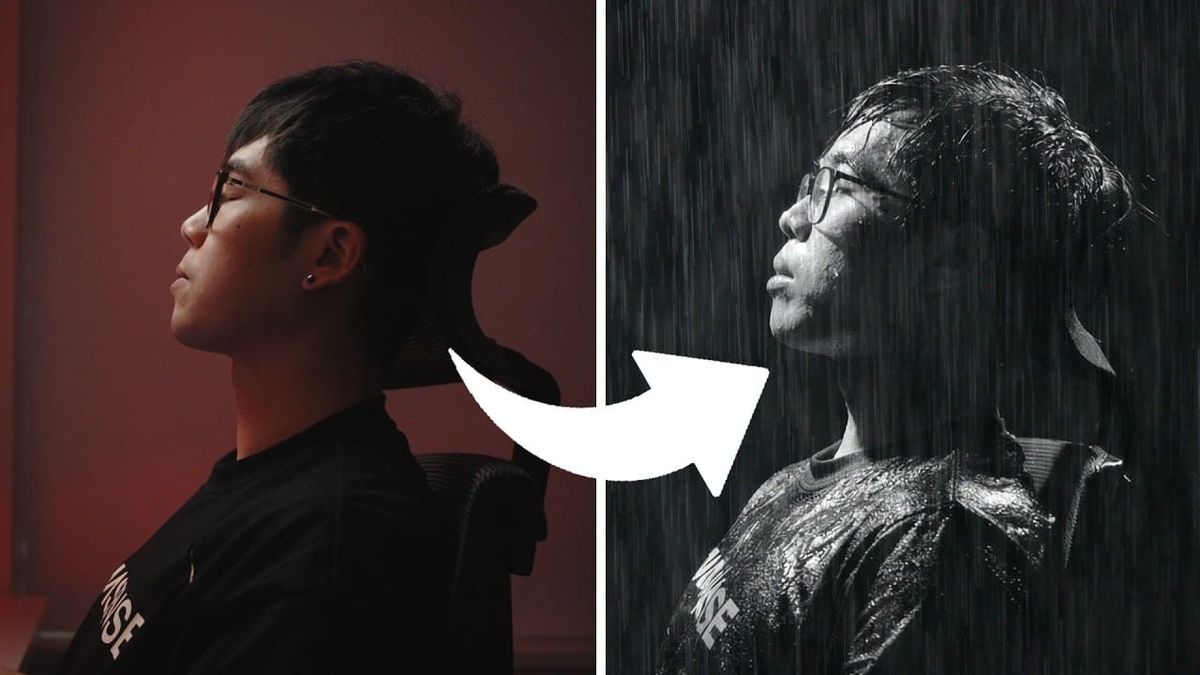
The practical application is repurposing shots that didn't make the cut — what he calls "trash" shots — by using AI video tools to add or change elements. A shot where a subject's eyes are open when they should be closed. A scene that needs rain that wasn't there on the day. A background element that needs to be different.
Starting from real footage preserves the physical properties that AI generation struggles to replicate: actual lighting, real depth of field, authentic human skin and movement. The AI intervention stays targeted and invisible because it's correcting or extending reality rather than constructing it from scratch.
2. Composite Real Artifacts Over AI Footage
When AI-generated footage is necessary, Huang's approach is to immediately layer real physical textures over it — film grain from actual scanned film stock, CRT textures, physical lens artifacts.
The reason is specific: AI video tools can't consistently replicate high-quality film grain or authentic analog artifacts. The grain they generate tends to look computational rather than photochemical. By compositing real scanned grain over AI footage, Huang bypasses the tool's weakness in that area entirely. The physical artifact anchors the synthetic image in a way that AI-generated texture can't.
3. Use AI for Shots You Literally Cannot Get
Huang's third principle reframes the question of when to reach for AI tools. Rather than asking "what cool thing can AI generate?" he asks "what shot is physically impossible or cost-prohibitive to capture?"
His examples: a dolly zoom in a space too tight for the move to happen physically, or a shot that would require a robot arm rig the production can't afford. AI video tools are most useful when they're solving a specific production constraint rather than generating aesthetic choices. When the tool is filling a gap that would otherwise go unfilled, the result integrates more naturally than when it's generating something the production could have shot practically.
4. Keep AI Away From Human Faces and Performances
The uncanny valley problem in AI video is most acute with human subjects. AI-generated people have enough off about their movement, skin response to light, and micro-expressions that audiences register something wrong even when they can't name it.
Huang's rule: keep AI for background and environmental elements. Set extensions, passing vehicles, fire, crowd fills, atmospheric effects — these work because audiences aren't scrutinizing them the way they scrutinize a human face. Real actors stay in the foreground doing real performances. As he puts it: "Real people are still the only ones who can deliver real performances and at the end of the day real people watch your work."
5. Keep AI Shots Short
The fifth principle is about duration. AI video artifacts that aren't visible in a two-second cut become visible in a six-second hold. The brain needs time to notice something is wrong, and a short cut doesn't give it that time.
Huang's application: use AI shots as bridges or interstitials between cuts of real footage rather than as held shots that ask the audience to live in them. A one-to-two second AI shot between two practical shots reads as part of the sequence. The same shot held for five seconds starts to break.
Competitive Context
The debate around AI video in professional filmmaking tends to polarize between "AI will replace cinematography" and "AI has no place in real filmmaking." Huang's framework sits in a more useful middle position: AI as a compositing and problem-solving tool, not a production replacement.
That framing has direct precedents in the history of digital tools. CGI spent years as a novelty before becoming invisible infrastructure in mainstream production. Color correction tools were once considered a replacement threat before becoming standard post-production workflow. AI video tools are likely to follow a similar trajectory — most useful when they're solving specific problems invisibly rather than generating entire sequences visibly.
The specific tools Huang uses aren't named in the research package, but the workflow principles apply across the current generation of AI video tools including Runway, Kling, Seedance, and others.
The Signal in the Noise
The most important reframe in Huang's approach is treating AI video as an editor's tool rather than a director's tool. The decision about when and how to use it happens in post, in response to specific problems in the footage — not in pre-production as a production strategy.
That shift in framing changes which questions matter. Not "what can AI generate?" but "what does this specific cut need that the footage doesn't have?" Not "how do I build a workflow around AI?" but "where does AI solve a problem I actually have?"
His conclusion is worth quoting directly: "Mixing in as many real elements as possible is what prevents AI videos from taking over my work." The tool is additive, not generative. That distinction is what keeps the work human.
Resources & Reads
- Herman Huang's full video: https://www.youtube.com/watch?v=0XcWkgHE4mA
- Happy Editing texture packs (mentioned as a resource in the video): search happyediting.com
- For context on current AI video tools: BRC's coverage of Runway, Seedance, and Kling is worth reading alongside this framework