Google's Newest AI Model Aims to Edit Videos the Way You'd Direct a Real Shoot
Google's Gemini Omni Flash isn't just another AI video generator, it's built to edit existing footage while keeping scenes coherent. Here's what developers have actually built with it.

Google introduced Gemini Omni Flash at I/O this year, and this week published a roundup of what developers have actually built with it since getting API access. The core pitch: Omni isn't primarily a text-to-video generator in the mold of Veo, Kling, or Seedance. It's built around editing existing footage, and understanding a scene well enough to change camera angle, lighting, or style without losing continuity, closer to how a director or editor would actually work a shot than how most AI video tools currently operate.
What Omni Actually Does Differently
Google's framing is direct: Omni combines "an intuitive understanding of physics with Gemini's real-world knowledge" to keep edits coherent rather than generating each variation from scratch. In practice, that means you can take a single clip and change what's happening around the subject, camera angle, lighting, weather, background, style, while the model maintains a consistent scene rather than treating each request as an unrelated new generation.
That's a genuinely different starting point than most of the AI video field this beat has covered. Seedance, Veo, and Kling are primarily generation tools, you describe a shot and get a new clip. Omni is positioned as an editing layer that understands an existing shot well enough to manipulate it while preserving what makes it recognizably the same scene.
What Builders Are Actually Doing With It
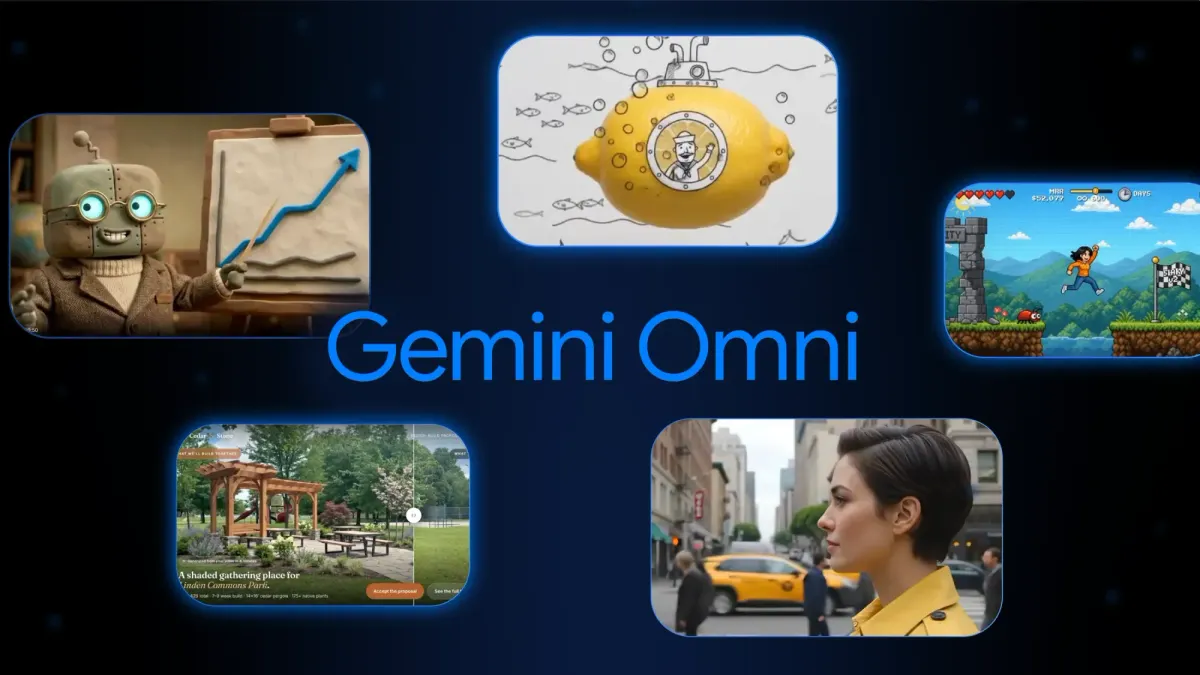
Google's roundup highlights five specific projects, each demonstrating a different capability.
Builder Leon Lin captured a single woman standing in a city from roughly 20 different camera angles and distances, close-up and far, head-on and profile, overhead and low, some zooming, some static, all while keeping her position and the scene's coherence intact across every variation.
Carlos Santana changed an entire outdoor scene using voice commands alone, shifting lighting from day to night, adding cloudy skies and rain sound, turning leaves orange, and covering the ground in snow, all through spoken instructions rather than manual editing.
Pan used Omni inside Google Flow to animate hand-drawn doodles into moving objects: a lemon became a submarine, an espresso cup became a hot air balloon, a match became a rocket ship, letting sketches directly guide how elements move in the final video.
Jerrod Lew rendered a single walking shot across four different animation styles, live-action, anime, claymation, and more, with the transitions never interrupting the subject's natural forward motion through the scene.
The team at Hyperagent used Omni for more applied, business-oriented visualization: layering landscaping into an empty park for a before-and-after design proposal, personifying data with an animated character explaining a dashboard, and gamifying a to-do list into an animated character clearing tasks.
Why the Editing Framing Matters
For filmmakers specifically, the more interesting capability isn't any single demo, it's the underlying idea of editing an existing shot rather than generating a new one from a text prompt every time. Reframing a shot, changing time of day, or applying a different visual style to already-captured footage without re-shooting or fully regenerating from scratch addresses a real production pain point that pure generation tools don't solve well.
Worth being direct about a limitation, too: every example in Google's own roundup is a short demo clip, not a finished narrative sequence, and there's no indication yet of how Omni handles longer-form editing, multi-shot consistency across an entire project, or production-grade output quality at scale. This is a capability demo from the model's own maker, not an independent evaluation.
Access
Omni is available now through the Gemini app, Google Flow, Google AI Studio, the Gemini API, and the Gemini Enterprise Agent Platform. Google hasn't published dedicated per-second or per-generation pricing specific to Omni in this announcement; access currently runs through existing Gemini and Flow subscription tiers and API billing.
Competitive Context
This adds a genuinely different entrant to the AI video landscape covered here previously, most major platforms (Seedance, Veo's own generation mode, Kling, FLUX 3 Video) compete primarily on generation quality, speed, and cost per clip. Omni's editing-first framing is a different axis of competition entirely, closer in spirit to what a compositing or grading tool does for traditional footage than to a pure generation model, even though it's built on the same underlying AI video technology.
The Signal in the Noise
The demos Google is highlighting are genuinely striking, particularly the 20-angle single-scene example and the voice-controlled environment editing. But it's worth remembering these are curated highlights from the model's own creator, not independent, hands-on testing against a real production workflow. The editing-over-generation framing is the part worth watching closely as more people get access: if Omni genuinely holds scene coherence across real editing tasks at production quality, it addresses a workflow gap none of the major generation-first platforms currently solve well.
Have you tried Omni's editing tools yet, or tested how it holds up on a real shot versus these demo clips? Curious what you found, drop it in the comments.