How to Connect Higgsfield to Claude: Setup, Models and Presets in MCP 2.0
How to add Higgsfield’s MCP connector to Claude: the setup steps, the models and presets it exposes, and the credit and plan details Higgsfield has published.

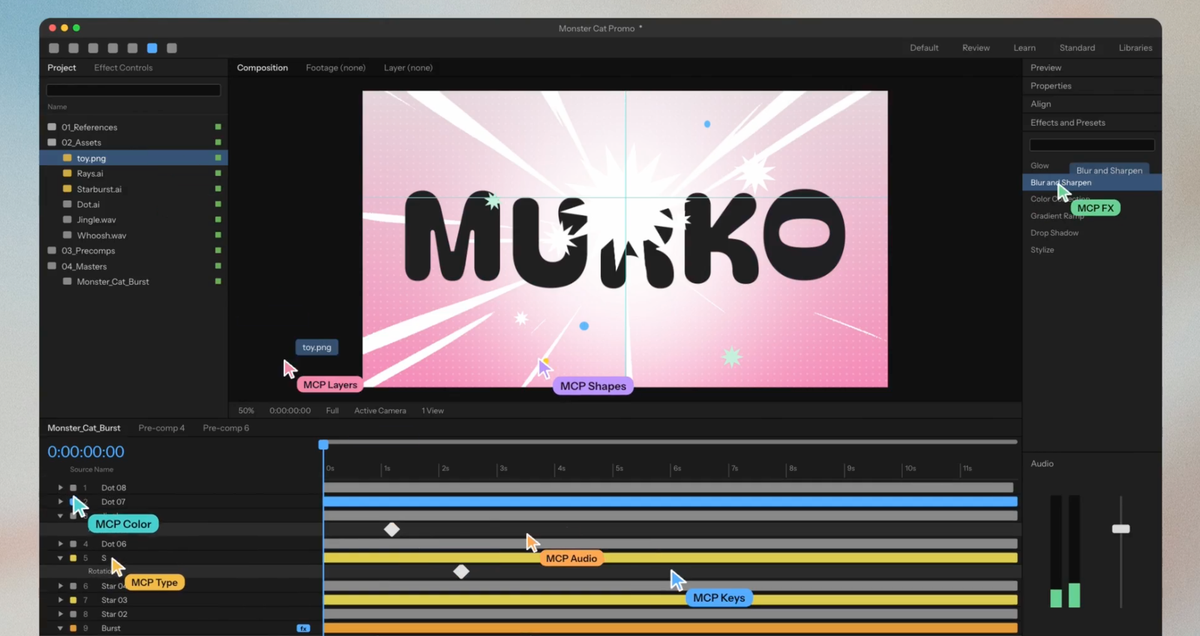
Higgsfield has released MCP 2.0 for Claude, and connecting it takes a custom connector, a sign-in and a Higgsfield account.
Once connected, Claude can generate images, video and audio through Higgsfield’s models from inside a chat.
How to Connect Higgsfield to Claude
Introducing Higgsfield MCP 2.0 for Claude.
— Higgsfield AI 🧩 (@higgsfield) November 18, 2026
Your entire creative studio, now inside Claude Fable 5.2.
> Pro-level tool integrations
> Multi-agent creative workflows
> Built-in quality control
Now available in Claude. Try it free for 3 days with unlimited generations in MCP 2.0 pic.twitter.com/3p8ARUvrtp
Higgsfield’s guides list the same four steps for Claude on the web or desktop.
- Open the Connectors menu and add a custom connector. Higgsfield’s guides place it under Customize in one and Settings in another, so the label depends on the Claude version.
- Name the connector Higgsfield and paste the server URL:
https://mcp.higgsfield.ai/mcp. - Click Connect and sign in with an existing Higgsfield account.
- Make sure the connector is enabled in the conversation you’re working in.
No API key is required.
To confirm it works, start a new chat and ask Claude for your Higgsfield credit balance.
What Claude Can Generate
Higgsfield’s guide lists more than 30 models, including Soul, Cinema Studio, Seedance 2.5 and Kling. Claude can pick a model if you don’t name one.
Images can be generated from a text prompt, a reference image or both, at up to 4K.
Video models accept reference assets where the model supports them. The tools also cover upscaling, reframing, background removal and motion controls.
Audio tools cover voiceovers, voice cloning, voice change and video dubbing. Claude can also browse past generations in your Higgsfield Assets and reuse them as references.
Higgsfield’s MCP page lists these video models: Seedance 2.5, Seedance 2.0, Kling 3.0, Kling 4.0, Veo 3.1, WAN 2.6, Grok Imagine 1.5, Gemini Omni Flash and MiniMax H3.
Image models include Nano Banana, Flux 2, Seedream 5, GPT Image 2.6, GPT Image 2 and Ideogram 4.5.
One-Click Presets
The MCP page lists presets that run as slash commands in Claude.
- Short Drama (
/short-drama) turns a script into an episode with a consistent cast. - UGC Flow (
/ugc-flow) builds creator-style product reviews. - Ad Recreator (
/marketing-adapt-video) adapts a reference video’s structure into an original ad. - Hook Multiplier (
/marketing-hook-variants) makes multiple opening hooks for one video. - Stickman Cartoon (
/stickman-explainer) and Editorial Motion Graphics (/vox-mixed-media) produce faceless explainers.
The page also lists Katana, which recreates aura edits from reference footage, Ad Strategist and Genjutsu.
A Workflow Example
Higgsfield’s guide walks through a medieval knight duel as a 10-second, 16:9 single shot.
The order is to confirm the connector, generate a reference image that fixes the look, generate the voiceover and audio, pick a video model that fits the audio approach, then generate the video.
Claude then reviews the output against the brief, and you can ask for specific edits before downloading from Higgsfield Assets.
Credits, Plans and the Free Trial
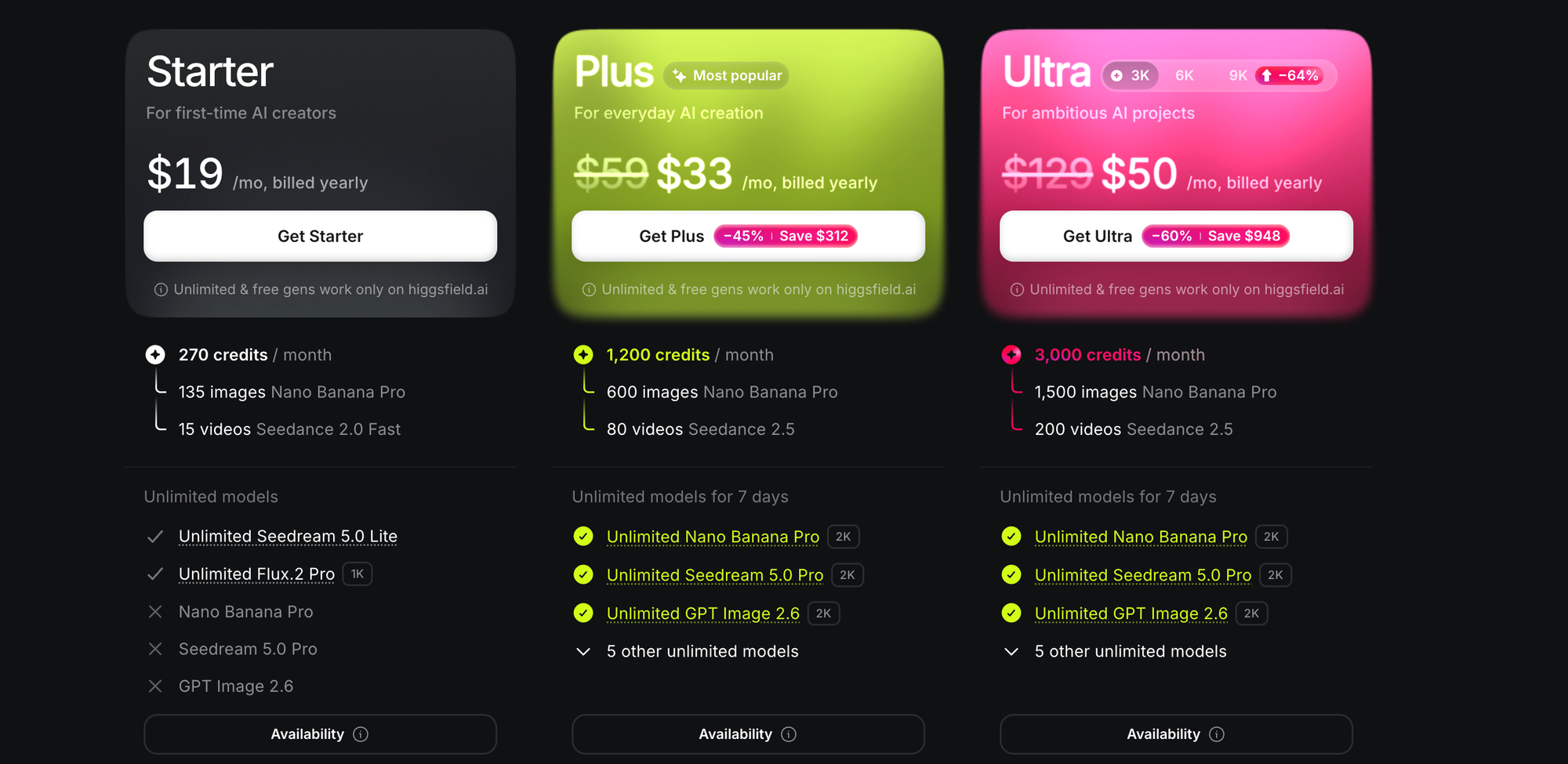
Generations use credits from your existing Higgsfield account. Higgsfield’s guide says there is no separate MCP balance, no extra MCP fee and no API key.
That guide also says an active paid subscription is currently required to connect and generate through MCP.
Higgsfield’s MCP 2.0 announcement offers a 3-day free trial with unlimited generations.
The two descriptions differ, so exact terms are available on Higgsfield’s website.
To control spend, Higgsfield suggests asking Claude to show the expected credit cost and wait for approval before running a generation.
Limits to Know
Reference files attached only to a Claude chat aren’t passed to Higgsfield automatically. Upload them through Higgsfield’s upload window and wait for confirmation before generating.
Voice clones are limited to five per workspace by default.
What MCP 2.0 Changes
Higgsfield’s guides don’t describe MCP 2.0, and neither mentions Claude Fable 5.2.
The MCP page includes a “Workflows with Fable 5.2” section with example projects, including a launch film made with one Claude operator and ten helpers in Blender. Higgsfield’s announcement lists multi-agent creative workflows among the features.
Competitive Context
Higgsfield isn’t the only creative tool reaching Claude through MCP. BRC covered Luma’s MCP connector for ChatGPT and Claude, and Adobe’s local MCP integrations for Premiere and After Effects.
For the protocol itself, see what MCP is.
Higgsfield’s help center also lists plugins for Premiere Pro, After Effects and DaVinci Resolve, alongside the Claude connector.
For the studio side of the platform, BRC’s Higgsfield Cinema Studio 4.0 guide covers genres, lenses and the emotion wheel.
The Signal in the Noise
The connection is simple, and the cost control is not automatic. Credits are charged as in a normal generation, so a long Claude session can spend them as fast as the web app.
Giving a chat assistant access to a paid account is an access decision. BRC’s AI agent permissions checklist covers what to check first.
The open questions are what MCP 2.0 changes from the earlier connector and which plans include access, and Higgsfield’s own pages haven’t answered either yet.