Film Emulation in DaVinci Resolve: The Best Plugins for Grain, Halation, and Color
From Resolve’s built-in Film Look Creator to SpektraFilm, FilmConvert Nitrate, Dehancer, ARRI Film Lab, and Genesis, here are the best film emulation plugins for Resolve and what they cost.


Getting digital footage to feel like film comes down to three things: grain, halation, and color. DaVinci Resolve can handle some of that on its own, but a growing set of film emulation plugins goes much further, from free options to tools built by ARRI.
Here are the best film emulation options for Resolve right now, what each one does well, and what they cost.
What Film Emulation Plugins Actually Do
Film emulation tools recreate how film stock responds to light. That includes the color and contrast of specific negative and print stocks, the texture of grain, and halation, the red-orange glow around bright highlights.
Some tools also add gate weave, the slight frame-to-frame movement of film running through a projector, and bloom. The best ones let you control each of these separately, so you can dial in a subtle texture or a heavy vintage look.
Film emulation works best on well-exposed log footage with a solid color pipeline. For background, see How to Expose S-Log3, C-Log2, and N-Log Without Guesswork and What Is a DRT in DaVinci Resolve?.
Resolve’s Built-In Tools
DaVinci Resolve Studio includes its own Film Look Creator, plus separate Film Grain and Halation effects. They’re a solid starting point and don’t require any extra purchases beyond Resolve Studio, which is a one-time $295.
The built-in tools are the place to learn what each film characteristic does before paying for a dedicated plugin. They offer less stock-specific modeling than the paid options below.
SpektraFilm (Free, Beta)
SpektraFilm is a free OpenFX plugin that simulates film by modeling how light moves through negative, print, and scan stages. It’s available for macOS, Windows, and Linux, and it’s currently in beta.
It’s the most technically ambitious free option. It’s a good fit for colorists who want a physically based approach without paying for one.
FilmConvert Nitrate ($119)
FilmConvert Nitrate is one of the longest-running film emulation plugins, and it’s known for camera-specific profiles. You pick your camera and film stock, and Nitrate matches the look based on how that camera captures color.
At $119 for the Resolve plugin, it’s the most affordable paid option here. It’s a strong pick for shooters who want consistent results quickly without building a look from scratch.
Dehancer Pro
Dehancer Pro includes more than 60 film profiles, plus print film emulation, grain, halation, and bloom. It’s popular with colorists who want detailed control over each part of the film look in one plugin.
Dehancer offers individual licenses alongside business subscriptions that start at $49 per month per seat. Exact pricing for individual Resolve licenses is available on Dehancer’s website.
ARRI Film Lab ($494.60)
ARRI Film Lab is ARRI’s own film emulation plugin. It adds grain matched to 50D, 200T, or 500T negative stocks, along with print stock color, halation, and gate weave, and it includes ARRI’s Look Library.
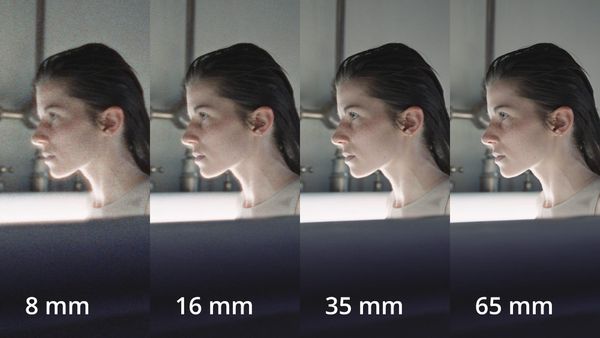
The new Film Lab 1.5 update adds 8mm, 16mm, and 65mm starting looks, anamorphic grain matching, a Halation Spread control, and ACES 2.0 support, covered in ARRI Film Lab 1.5 Is a Free Update. A permanent license is $494.60, with monthly and yearly options available.
Genesis ($999 and Up)
Genesis is Cullen Kelly’s film emulation plugin, developed with a film chemist and a cinematographer. It models 42 negative stocks and 13 print stocks.
It’s priced at $999 for Indie and $1,999 for Pro, with a free watermarked trial. It’s aimed at professional colorists who want the most detailed stock-level emulation available.
Competitive Context
The film emulation category has grown quickly as more productions chase a film look without shooting film. Some productions still shoot actual film, like Alejandro G. Iñárritu’s Digger in VistaVision, covered in “Nothing Casual in Every Frame”: Inside the VistaVision Cinematography of Digger.
For digital productions, these plugins span a wide range. Free and low-cost tools cover most needs, while ARRI Film Lab and Genesis target colorists who want deeper control and stock-specific accuracy.
The Signal in the Noise
Start with Resolve’s built-in tools or SpektraFilm to learn what you like. FilmConvert Nitrate is the easiest paid upgrade for consistent results.
Dehancer is a strong middle ground for detailed control. ARRI Film Lab and Genesis make the most sense for professional colorists who grade often, and both offer trials worth using on a real project first.
Specs & Pricing
| Plugin | Price | Notable Features |
|---|---|---|
| Resolve Film Look Creator | Included with Resolve Studio ($295) | Built-in grain, halation, film color |
| SpektraFilm | Free (beta) | Spectral negative/print/scan modeling |
| FilmConvert Nitrate | $119 | Camera-specific profiles |
| Dehancer Pro | Pricing on Dehancer’s website | 60+ film profiles, print, grain, halation, bloom |
| ARRI Film Lab 1.5 | $494.60 permanent; subscriptions available | 8mm–65mm looks, halation, gate weave, ACES 2.0 |
| Genesis | $999 Indie / $1,999 Pro | 42 negative and 13 print stocks |
Which film emulation tool is in your Resolve grades right now? Share your favorite and why in the comments.