How to Keep Characters Consistent in AI Video: Reference Images, LoRAs, and Keyframes
Faces shift and outfits change between AI video shots. Here are the methods that keep characters consistent, from character sheets to reference images, keyframes, and LoRAs.

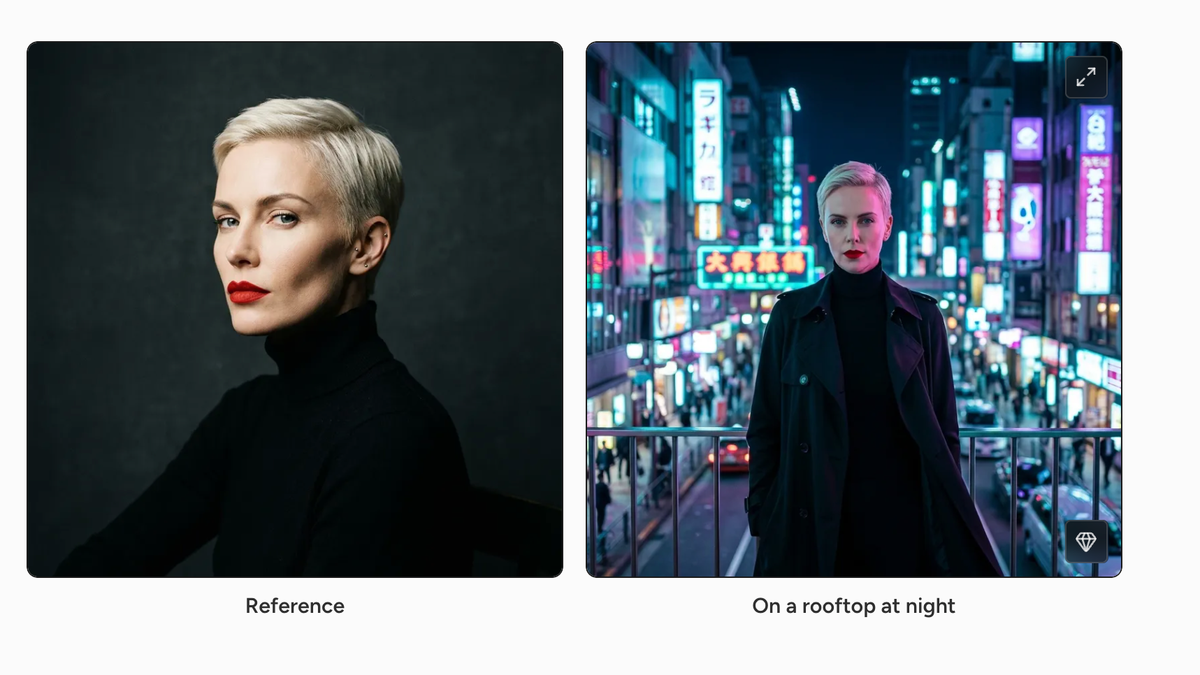
Keeping the same character from shot to shot is one of the hardest parts of making anything longer than a single AI clip. Faces shift, outfits change color, and a character can look like a different person by the third shot.
The tools have improved a lot, and most major platforms now offer some way to lock in a character’s identity. Here are the methods that work, from simple prompt habits to trained identities, and how to combine them.
Why AI Characters Drift Between Shots
AI video models generate every clip from scratch. Unless you give the model something to anchor to, it reinterprets your text description each time, and small details like jawline, hair, and clothing change.
The more a shot changes, the more a character drifts. New angles, new lighting, and big movements give the model more room to improvise.
Every method below works the same way: it gives the model more fixed visual information about the character so it has less to guess.
Method 1: Build a Character Sheet First
Start with still images before you make any video. Generate one clean portrait of your character, then use an image model to build a character sheet: front, three-quarter, and profile views, plus a full-body shot in costume.
Google’s Nano Banana 2 accepts up to 14 reference images in a single request, according to Runware’s character consistency guide. That makes it well suited to building sheets and placing the same character into new scenes. Midjourney’s character reference parameter does a similar job from a single image.
Runware’s guide also recommends a separate reference for each angle you plan to show, since one image only shows the model one viewpoint. Keep the sheet in a folder, because every later step draws from it.
Method 2: Start Every Shot From an Image
Image-to-video is the most reliable way to keep a character consistent in a single shot. Instead of describing the character in text, you generate a still frame that already looks right and animate it.
Many tools also let you set a first and last frame, which keeps the character consistent at both ends of a clip. For more on how this works, see What Are Keyframes in AI Video?.
The workflow is simple: generate each shot’s opening frame from your character sheet, check that it matches, then send it to video. Drift that does happen tends to come later in the clip, so shorter shots hold up better.
Method 3: Use Reference-to-Video Features
Most major video platforms now accept reference images directly, without needing a start frame. Runway’s Gen-4.5 uses a single portrait as an identity anchor, and Seedance 2.0 accepts up to nine reference inputs, according to Higgsfield’s guide to consistent characters.
Kling 3.0 offers multi-shot character consistency that keeps the same face across cuts and spoken clips. The names and limits of these features change with almost every model update, so check your platform’s current documentation before planning a project around one.
Reference-to-video is faster than building start frames for every shot. The tradeoff is that you have less control over composition.
Method 4: Train a Custom Identity
For recurring characters, training a custom identity gives the strongest results. Higgsfield’s Soul ID builds a persistent identity from 20 or more photos taken from different angles, with training taking a few minutes.
LoRAs do the same job in open-source workflows like ComfyUI. You train a small add-on model on 15 to 30 images of your character, and it loads alongside the main model at generation time. For the basics, see What Is a LoRA?.
Trained identities take more time up front but pay off on longer projects. They work best when your training images are varied, well lit, and consistent in costume.
Method 5: Lock Your Prompt Language
Even with references, the words in your prompt matter. Write a short, fixed description of your character covering hair, clothing, and one or two distinctive features, and paste it unchanged into every prompt.
Change only the action, setting, and camera move from shot to shot. Rewording the character description invites the model to reinterpret it.
Simple costumes help too. A solid jacket holds up across shots far better than a detailed pattern, and accessories like glasses or a distinctive hat give the model easy anchors.
Method 6: Check, Regenerate, and Fix in the Edit
No method gets to 100% yet. Generate your full sequence, line the shots up side by side, and regenerate any clip where the face or outfit drifts.
In the edit, cutting on motion, using wider shots for transitions, and saving close-ups for the clips that match best all help hide small differences. Color grading the sequence as a whole also smooths over the lighting shifts that make characters look different.
Competitive Context
Each platform handles this differently. Higgsfield leans on trained identities with Soul ID, Runway and Seedance focus on reference inputs at generation time, and Kling builds consistency into multi-shot generation.
Image models have become the starting point for most consistent-character workflows. Open-source tools like ComfyUI still offer the most control through LoRAs, at the cost of more setup.
If you want to keep a real performance instead of generating one, motion-transfer tools like Higgsfield’s Genjutsu take a different approach, covered in A Beginner’s Guide to Higgsfield Genjutsu.
The Signal in the Noise
For most projects, the most reliable workflow combines three methods. Build a character sheet, start every shot from an image made from that sheet, and keep your character description locked in every prompt.
Add a trained identity or LoRA when a character needs to appear across many scenes or episodes. Whatever tools you use, plan on regenerating some shots, and budget your credits with that in mind.
The Details
- Fastest method: Reference-to-video features in your platform of choice
- Most reliable per shot: Image-to-video from a character-sheet frame
- Best for recurring characters: Trained identities (Soul ID) or LoRAs
- Nano Banana 2: Up to 14 reference images per request
- Seedance 2.0: Up to 9 reference inputs
- Soul ID training: 20+ photos
- LoRA training: Typically 15–30 images
What’s your go-to method for keeping characters consistent in AI video? Share what’s working for you in the comments.