How to Use Seedance 2.5 Draft Mode to Cut Your AI Video Costs
Seedance 2.5 Draft Mode lets you preview AI video at 480p for about $0.22 per second, then finish only the takes you keep at 1080p. Here’s how it works and when it saves money.

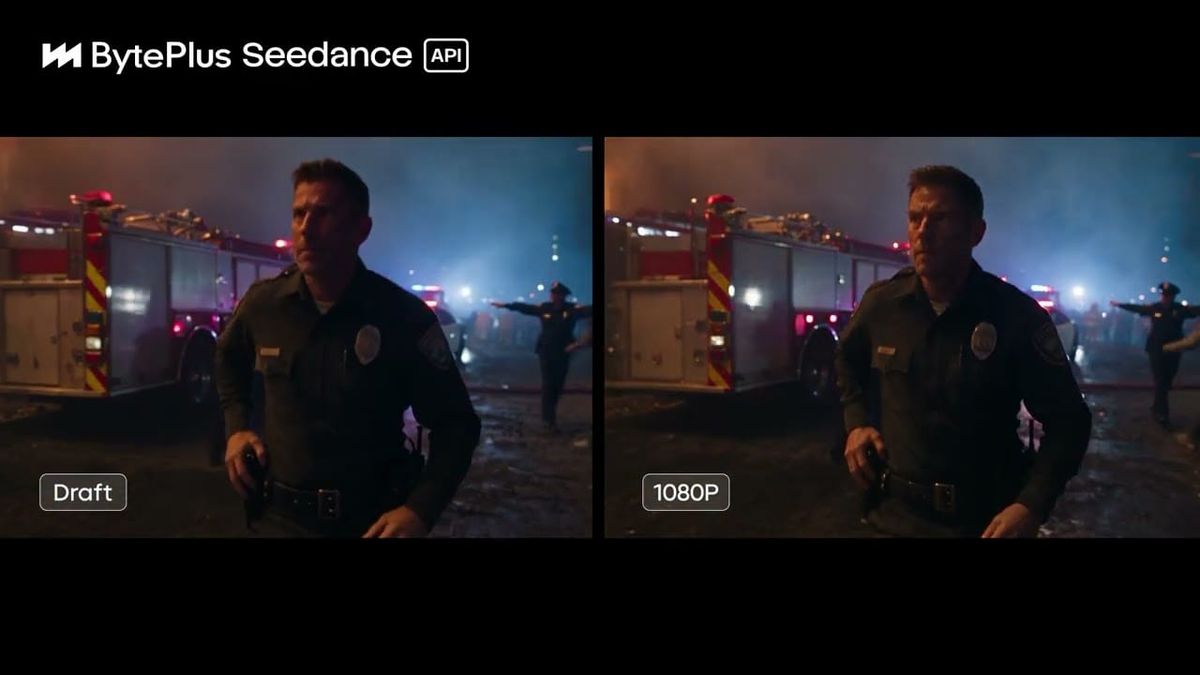
Generating AI video at full resolution gets expensive fast, especially when most takes don’t make the cut. Seedance 2.5’s Draft Mode is built to fix that: you preview a clip at 480p first, then pay to complete it at 1080p only once you know it’s the one you want.
fal now offers Seedance 2.5 Draft Mode on U.S.-hosted infrastructure, across text-to-video, image-to-video and reference-to-video. Here’s how it works, what it costs and when it actually saves money.
What Draft Mode Does
With Draft Mode turned on, Seedance 2.5 generates a lower-resolution 480p preview of your clip and returns a draft ID. If you like the result, you send that draft ID to a separate completion endpoint, which produces the same video at 1080p.
Drafts stay valid for 14 days and can only be completed by the account that created them. That gives you time to generate several options, review them and finish only the best ones.
Seedance 2.5 supports clips up to 30 seconds with synchronized audio. Draft Mode has also been available on other platforms, including Higgsfield, since September.
How to Use It on fal
Seedance 2.5 US Draft mode is now available on fal
— fal (@fal) October 30, 2026
Preview at 480p first, then complete the same video at 1080p
Works across text-to-video, image-to-video and reference-to-video
Drafts stay valid for 14 days on US-hosted infrastructure pic.twitter.com/fWQbSn49bg
- Open a Seedance 2.5 U.S. endpoint. Choose text-to-video, image-to-video or reference-to-video on fal.
- Turn on Draft. Enter your prompt and settings, switch on the Draft option and generate.
- Review the 480p preview. Check motion, framing, performance and audio. The output includes a draft ID.
- Iterate. Adjust your prompt or references and generate more drafts until you have a take you want to keep.
- Complete at 1080p. Open the Seedance 2.5 U.S. draft completion endpoint, paste the draft ID and run it. You can choose H.264, H.265 or automatic codec selection.
For a broader walkthrough of Seedance 2.5 across platforms, see How to Get Started With Seedance 2.5 on Dreamina, Runway and fal.
What It Costs
fal lists Seedance 2.5 U.S. pricing at roughly $0.22 per second at 480p, $0.47 per second at 720p and $1.16 per second at 1080p. The draft completion endpoint is billed at the 1080p rate.
fal doesn’t list a separate draft price. Since drafts generate at 480p, the 480p rate is the best guide. Here’s how that plays out for a 10-second clip:
- Straight to 1080p, one attempt: about $11.64
- Draft, then complete, one attempt: about $2.21 + $11.64 = $13.85
- Straight to 1080p, three attempts: about $34.92
- Three drafts, then complete one: about $6.62 + $11.64 = $18.26
When It Saves Money
Draft Mode costs slightly more if your first take is the keeper, since you pay for the draft and the completion. It starts saving money as soon as you need a second attempt, and the savings grow with every take you throw away.
For most AI video work, where getting the right motion, performance or camera move takes several tries, that makes Draft Mode the cheaper way to work. It’s especially useful for longer clips, since a bad 30-second take at 1080p costs about $35.
If you use video references, fal charges for both the input and output video, so factor reference length into your estimate.
Why U.S. Hosting Matters
fal’s Draft Mode endpoints run on U.S.-hosted infrastructure. For agencies, brands and production companies with rules about where client data and prompts can be processed, that can make Seedance an option where ByteDance’s own platforms aren’t.
Competitive Context
Most AI video platforms charge full price for every generation, regardless of whether you keep it. Some offer cheaper “fast” or lower-resolution model variants, but those are separate generations that have to be redone at full quality.
Draft Mode’s advantage is continuity: the 1080p completion is based on the draft you approved, rather than a fresh roll of the dice. For comparison, Pika’s new H3 Flex uses a similar draft-to-video approach for its higher-resolution finishing, covered in Pika H3 Flex Generates Video With Separate Audio Stems.
The Signal in the Noise
If you regularly generate several takes to get one usable clip, Draft Mode is worth making your default on fal. Previewing at about a fifth of the 1080p price means you spend most of your budget only on takes you’re going to use.
The one caveat is that fal doesn’t spell out draft pricing separately, so check your usage after your first few runs to confirm the savings match the math.
How many takes does it usually take you to get a usable AI clip? Share your hit rate in the comments.
Specs & Pricing
- Model: ByteDance Seedance 2.5 (U.S.-hosted on fal)
- Draft resolution: 480p
- Completion resolution: 1080p only
- Draft validity: 14 days, same account only
- Modes: Text-to-video, image-to-video, reference-to-video
- Max clip length: 30 seconds, with audio
- Pricing (per second, approx.): $0.2205 (480p), $0.4730 (720p), $1.164 (1080p)
- Completion codec: Auto, H.264 or H.265