Knives Out Director Rian Johnson and His DP Put Their Movie Color Science in an iPhone App
Rian Johnson and DP Steve Yedlin released Chromagraph Camera, a $12.99 iPhone app that shoots RAW and applies the same image processing they use on their films.


Rian Johnson and his longtime cinematographer, Steve Yedlin, have released Chromagraph Camera, a $12.99 iPhone app that shoots RAW stills and processes them with the same pipeline they use on their films. Johnson announced the app on X on October 28.
“So I recently badgered my cinematographer @steveyedlin into making my ideal iPhone still camera app,” Johnson wrote. He said the app bypasses the iPhone’s look processing and uses the same image processing as their movies.
What Chromagraph Does
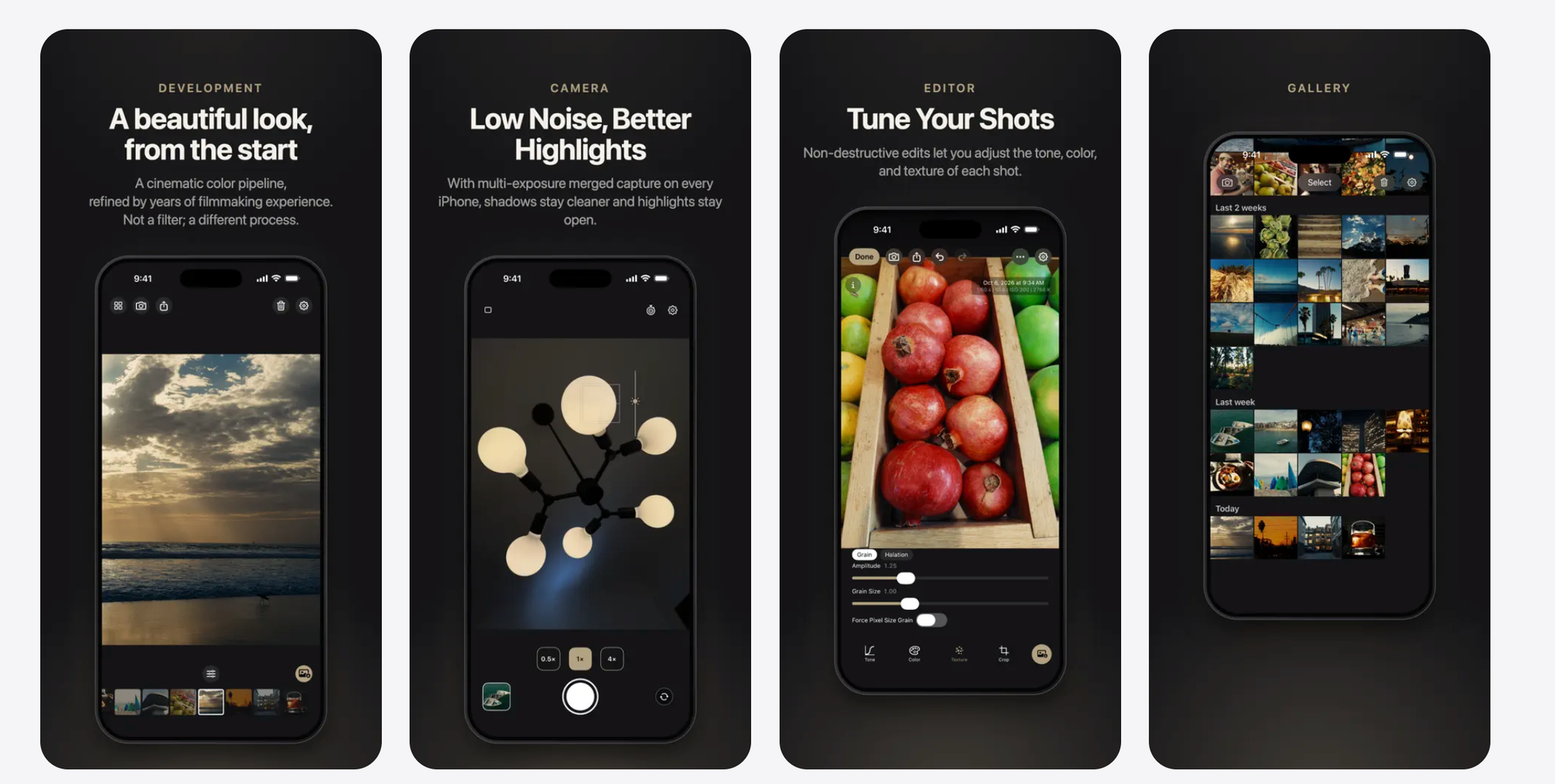
Chromagraph captures from the iPhone’s RAW data rather than Apple’s processed image, then applies a color and texture look designed by Yedlin. According to the App Store listing, you frame shots without seeing the final look, then review the processed image in the app’s gallery.
Inside the app, you can fine-tune color, exposure, grain and halation while keeping the base look intact. The gallery stores full-quality RAW files, and you can export JPEG or HEIC versions with the look applied, either manually or automatically to your photo library.
The App Store screenshots also describe merging multiple exposures on iPhone to keep shadows cleaner and hold highlights. Johnson said the app is meant as a one-stop shop: take the shot, adjust if needed and export to your camera roll.
Who Built It
Yedlin has shot nearly all of Johnson’s features, including Brick, Looper, Star Wars: The Last Jedi, Knives Out, Glass Onion and Wake Up Dead Man. He is also known in the industry for his work on color science and image pipelines, and for arguing that a film’s look comes from how images are processed more than from which camera captured them.
Johnson said he asked Yedlin and color science coder Eric Cameron to build the app because he takes a lot of photos on his phone and wanted it for himself. They decided to release it publicly. The App Store lists the developer as Chromatic Applications LLC.
The Caveats
I honestly just asked Steve (and our genius color science coder friend Eric Cameron) to make it because I take a ton of pics with my phone and wanted to have it for myself, and they figured hey, let's put it out there. Hope you enjoy! pic.twitter.com/PrfNhkgaB7
— Rian Johnson (@rianjohnson) October 28, 2026
Chromagraph is stills only. Johnson said video may come later, but it would likely only be possible on the last few generations of Pro iPhones.
It’s also iPhone only, with no Android version planned. Johnson said Apple’s hardware consistency is what lets the small team tune the processing with confidence, while Android devices vary too much to dial in for every phone. The app requires iOS 17 or later.
Competitive Context
Chromagraph joins a group of third-party iPhone camera apps that work around Apple’s default processing. Halide offers a mode that skips Apple’s image pipeline, and Apple’s own ProRAW gives Pro iPhone users RAW files to grade themselves.
The difference is the finished look. Most RAW camera apps hand you a flat file to edit. Chromagraph ships with a cinematographer’s complete color pipeline built in, plus grain and halation controls. For more on halation, see How to Add Halation in DaVinci Resolve for Free.
The Signal in the Noise
At $12.99 with no subscription listed, Chromagraph is a low-cost way to see what a feature film’s color pipeline does to everyday photos. For cinematographers and colorists, it’s also a rare consumer-facing look at Yedlin’s approach to image processing.
The limits are real. It doesn’t shoot video, it isn’t on Android, and it’s a one-look app by design. Anyone who wants many film stocks or full manual grading will still want other tools.
Would you shoot your everyday photos through a cinematographer’s color pipeline? Share what you’d want from a video version in the comments.
Specs & Pricing
- App: Chromagraph Camera
- Developer: Chromatic Applications LLC
- Price: $12.99 (App Store)
- Platform: iPhone and iPad, iOS/iPadOS 17.0 or later
- Capture: RAW stills, with optional multi-exposure merging
- Editing: Color, exposure, grain and halation tools
- Export: JPEG or HEIC with the look applied; full-quality RAW stored in the app
- Video: Not supported