What Is Runway Aleph — and How Is It Different From Gen-4.5?
Runway has two video models that serve completely different purposes: Gen-4.5 generates from scratch, Aleph edits what already exists. Here's when to use each — and why the distinction matters for your credit budget.


Runway has two distinct video models that serve completely different purposes, and the confusion between them costs creators credits and time. Gen-4.5 generates video from scratch. Aleph edits video that already exists. They're not interchangeable, and knowing which one to reach for — and when — is one of the most useful things you can understand about the platform.
What Gen-4.5 does
Gen-4.5 is Runway's generation model. Give it a text prompt, an image, or a reference frame and it produces a new video clip — 5 or 10 seconds, up to 4K, with the motion, composition, and visual style described in your prompt. It costs 25 credits per second and is the model most Runway users think of when they think of "using Runway."
Gen-4.5 is what you use when you're creating something that doesn't exist yet.
What Aleph does
Aleph is Runway's in-context video editing model, available in Edit Studio. The workflow is fundamentally different from generation: you start with an existing video clip — either AI-generated or real footage — select a specific frame, make a change to that frame, and Aleph propagates the change through the rest of the clip while maintaining the original motion and temporal consistency.
The change can be: adding an object that wasn't there, removing an element that was, altering lighting or color treatment, changing the visual style entirely, or modifying the background while keeping the foreground subject intact.
Aleph is what you use when you have a clip and need to change something in it without regenerating from scratch.
Why this distinction matters practically

The practical value of Aleph becomes clear when you think about the alternative. Without it, fixing a problem in a generated clip means full regeneration — spending another 25 credits per second for Gen-4.5, hoping the new generation solves the problem while not introducing new ones, and potentially iterating multiple times.
With Aleph, you fix the specific problem in the specific frame and let the model propagate the fix. A 5-second clip fix costs 5 seconds × 15 credits = 75 credits. The same fix via full Gen-4.5 regeneration costs 5 seconds × 25 credits = 125 credits — and doesn't guarantee the fix actually lands without new issues.
The credit math favors Aleph for fixing, refining, and modifying. The quality ceiling of Gen-4.5 makes it the right choice for creating.
What Aleph can change in an existing clip
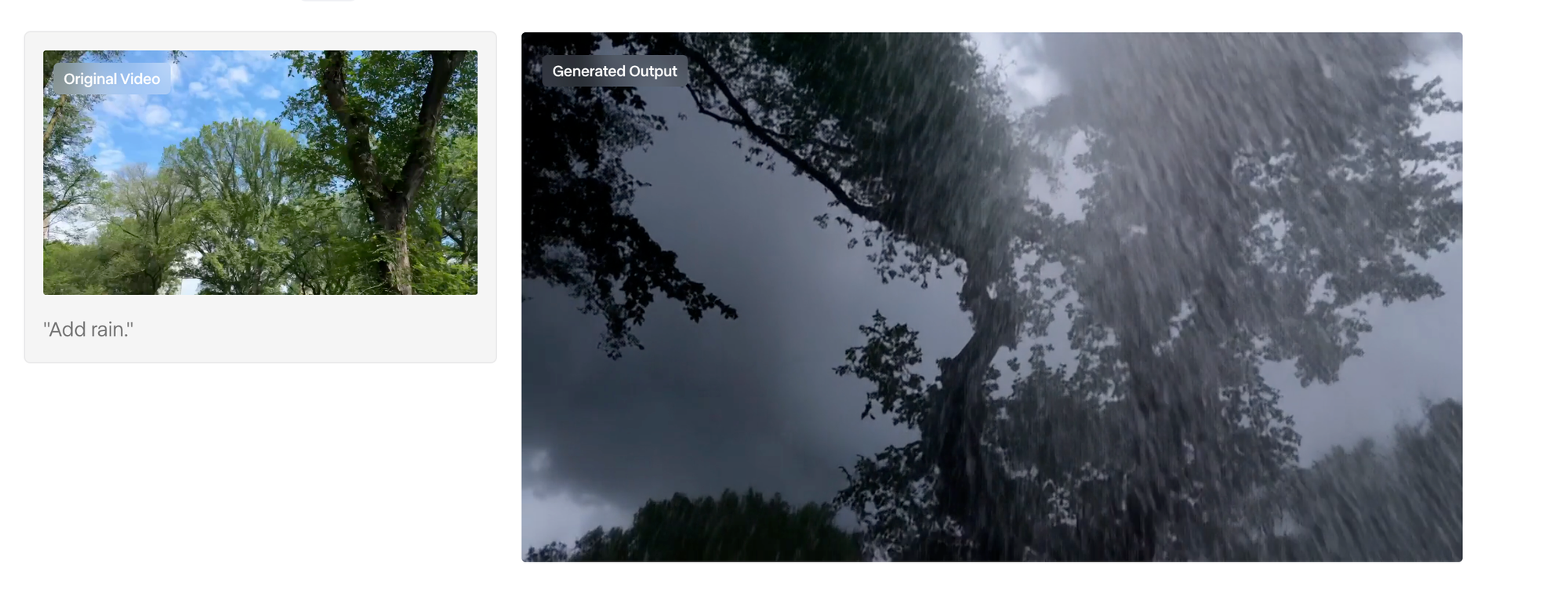
Adding elements: An object, prop, or environmental detail that wasn't in the original generation. A character holding something. A window in a background wall. A product on a table that wasn't there.
Removing elements: Unwanted objects, visual artifacts from the generation, background elements that don't fit. Similar to inpainting but applied across the full clip's motion rather than a single frame.
Lighting and color adjustments: Changing the overall lighting treatment — warmer, cooler, more dramatic, softer — across the clip. Useful for matching a generated clip to adjacent shots in a sequence that have different lighting.
Style transfer: Changing the visual style of the clip — more cinematic, more graphic, different color grade — while keeping the motion intact.
Background replacement: Changing what's behind a subject while maintaining the subject's motion and appearance. More controlled than the full Background Removal tool for clips where you want specific background content rather than a clean key.
What Aleph can't do

Aleph works within the existing clip's motion and temporal structure. It can change what's in the frame, but it can't change how things move. It can't add a new camera movement to a static clip, change the duration of a clip, or fix a motion artifact in the way that Gen-4.5 would by regenerating the physics from scratch.
For problems that are fundamentally about motion — a character's walk looks wrong, a camera move drifts — regeneration with Gen-4.5 is still the right answer. Aleph solves appearance and content problems, not motion problems.
The workflow that uses both correctly
A production-grade workflow using both tools looks like this:
- Generate with Gen-4.5 — text or image to video, getting the motion, composition, and character right
- Review the output — identify what works and what needs to change
- Fix with Aleph — targeted changes to content, lighting, or style in the frames that need it, propagated through the clip
- Finalize in the editor — trim, stitch, export
This sequence treats Gen-4.5 and Aleph as sequential steps in the same pipeline rather than competing alternatives. Gen-4.5 creates; Aleph refines.
Aleph 2.0: what changed
Runway's current version is Aleph 2.0, which introduced "Edit Studio" as the dedicated interface. The key update in 2.0: you now edit a frame the way you want it and Aleph edits the rest of the video to match, rather than specifying changes through a text prompt alone. The visual edit to a frame becomes the instruction — more intuitive than text-based direction for spatial and compositional changes.
Credit cost comparison
- Gen-4.5: 25 credits per second
- Aleph (via Edit Studio): 15 credits per second
- Aleph is 40% cheaper per second than Gen-4.5
For a 10-second clip: Gen-4.5 regeneration costs 250 credits. Aleph edit costs 150 credits. The 100-credit difference across multiple refinement passes compounds quickly on a Standard plan's 625-credit monthly allocation.



