How to Upscale AI Video to 4K: The Best Tools and Workflows in 2026
Most AI video models still generate at 720p or 1080p. Here’s how to get to 4K, from Topaz and FLUX to budget upscalers on fal, plus what each costs for a 10-second clip.

Most AI video models still generate at 720p or 1080p, and the ones that offer native 4K charge a premium for it. For anyone delivering to YouTube, client screens or a big monitor, upscaling has become a standard final step in AI video work.
The good news is that there are more upscalers than ever, at prices ranging from fractions of a cent to several dollars per clip. Here’s how to decide between native 4K and upscaling, which tools to consider and how to fit upscaling into your workflow.
Native 4K vs. Upscaling
Some models and platforms now offer 4K directly. Pika’s H3 Flex offers 4K finishing through its API at $0.08 per second at launch pricing, covered in Pika H3 Flex Generates Video With Separate Audio Stems, and ByteDance offers a 4K tier of Seedance through BytePlus for enterprise customers.
Most creators, though, generate at 720p or 1080p and upscale afterward. It’s usually cheaper, it lets you upscale only the clips you actually use, and it works with whichever video model gives you the best result.
The rule of thumb: generate at the lowest resolution that lets you judge the shot, finish at 1080p, and upscale only your final picks. For one way to cut costs at the generation step, see How to Use Seedance 2.5 Draft Mode to Cut Your AI Video Costs.
Generative vs. Faithful Upscalers
Upscalers fall into two broad camps, and choosing the right one matters more than choosing the brand.
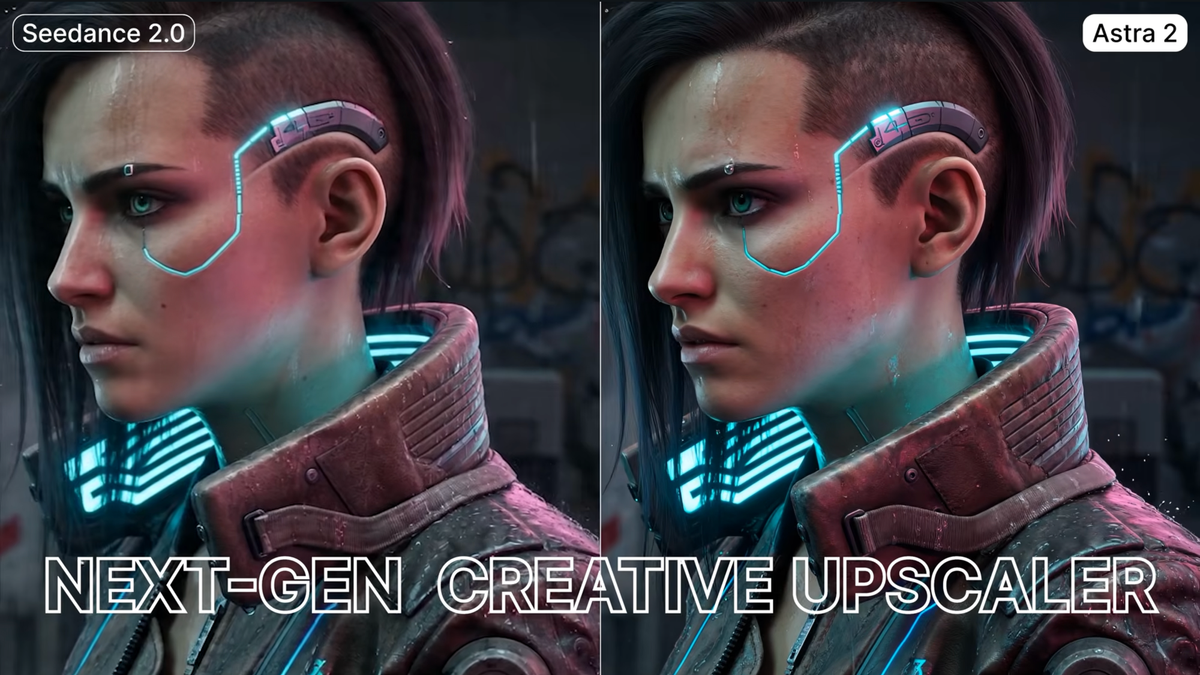
Generative upscalers invent new detail as they enlarge the image. They can make soft AI footage look dramatically sharper, but they can also change faces, textures and small details. Topaz’s Astra 2 and the Creative mode of Black Forest Labs’ FLUX Video Upscaler are examples.
Faithful upscalers stay closer to the source, enlarging and cleaning the image without reinventing it. They’re safer for footage where accuracy matters, like faces, products or text. Topaz Proteus, the Precise mode of the FLUX upscaler and RealESRGAN fall into this group.
For AI-generated footage, a light generative pass often looks best. For live-action footage or anything with recognizable people or products, start with a faithful option.
The Main Upscaling Tools
Topaz Labs remains the best-known name in video upscaling, with both desktop software and cloud models. On fal, Topaz Astra 2 costs $3 per 10 seconds up to 1080p or $5 at 4K, and Topaz Starlight Precise 2.6, a realism pass designed for AI-generated footage, costs $2.60 per 10 seconds at 4K. Topaz Proteus, a non-generative option with manual controls for noise, grain and detail, costs $0.60 per 10 seconds at 4K.
FLUX Video Upscaler from Black Forest Labs offers Precise and Creative modes, scaling clips up to 4K from sources of 480p and up. Clips are limited to 20 seconds and 50MB. BFL recently upgraded it and says it’s faster and cheaper than Topaz Astra 2, covered in Black Forest Labs Upgrades Its FLUX Video Upscaler, Taking Aim at Topaz.
Budget options on fal are surprisingly capable for simple jobs. ByteDance’s Video Upscaler starts at about $0.03 per second at 4K on its standard tier and includes a preset for AI-generated footage. SeedVR2 and RealESRGAN are priced per megapixel and cost very little per clip.
DaVinci Resolve Studio includes Super Scale, which upscales clips inside your edit. It’s the most convenient option if you’re already finishing in Resolve and don’t need a separate service.
What It Costs: A 10-Second Clip to 4K
Pricing models vary, with some upscalers billing per second, some per megapixel and some per clip, so direct comparisons take some math. Here’s roughly what it costs to take a 10-second clip to 4K on fal, based on fal’s published rates:
- ByteDance Video Upscaler (standard, 30fps): about $0.29
- Topaz Proteus: $0.60
- Topaz Starlight Precise 2.6: $2.60
- Topaz Astra 2: $5.00
- FLUX Video Upscaler (Precise): about $5.50
- FLUX Video Upscaler (Creative): about $7.90
Rates change often, so check current pricing before running a large batch.
A Practical Upscaling Workflow
- Generate and edit at 1080p. Lock your cut first, so you only pay to upscale shots that make it into the final edit.
- Pick the right type of upscaler for each shot. Use a faithful upscaler for faces, products and text, and consider a generative pass for stylized or soft AI shots.
- Test on one clip. Run your hardest shot through two or three options and compare them at 100% on a 4K display.
- Watch for artifacts. Check faces, hands, text and fine textures for warping or flicker between frames, which is where generative upscalers most often go wrong.
- Upscale before your final grade. Grading after upscaling lets you correct any shifts in color or contrast the upscaler introduces.
- Split long clips if needed. Some upscalers, like FLUX’s, cap clip length, so longer shots may need to be cut into segments first.
Competitive Context
Upscaling has become a competitive category of its own. Topaz built its reputation on desktop software, but cloud platforms like fal now host many upscalers side by side, and model makers like Black Forest Labs and ByteDance offer their own.
At the same time, video models keep inching toward native high resolution. As more models offer affordable 4K output, upscaling may shift from a necessity to a finishing choice.
The Signal in the Noise
For most creators, generating at 1080p and upscaling final picks is still the most cost-effective path to 4K. The bigger decision isn’t Topaz vs. FLUX, but generative vs. faithful, and that depends on what’s in the shot.
Start with an inexpensive option on a test clip. Many AI shots look great with a sub-$1 upscale, and you can save the premium generative passes for hero shots that need them.
Which upscaler has given you the best results on AI footage? Share your go-to in the comments.
Specs & Pricing
- Topaz Astra 2 (fal): $3 per 10 sec up to 1080p; $5 per 10 sec at 4K
- Topaz Starlight Precise 2.6 (fal): $1.20 per 10 sec up to 1080p; $2.60 at 4K
- Topaz Proteus (fal): $0.60 per 10 sec at 4K
- FLUX Video Upscaler (fal): Precise $0.55/sec at 4K; Creative $0.79/sec at 4K; max 20 sec, 50MB
- ByteDance Video Upscaler (fal): About $0.0288/sec at 4K (standard, 30fps)
- Bria Video Upscaling (fal): $0.14/sec, up to 8K
- SeedVR2 (fal): $0.001 per megapixel of video
- DaVinci Resolve Studio: Super Scale built in; Studio is $295
- Pika H3 Flex 4K finishing: $0.08/sec (launch pricing)