How to Get the Most Out of Kling's Free Tier
Kling 3.0's free tier gives you 66 credits every day — no credit card, no expiry. Here's how to use that daily allocation strategically before deciding whether to pay.

Kling 3.0 has the most generous free tier of any major AI video platform — 66 credits daily, refreshing every day, no credit card required. That's not a trial. That's an ongoing, usable allocation that makes Kling legitimately functional for evaluation and light production use without paying anything.
Here's how to use it strategically rather than burning through it on failed experiments.
What the free tier actually gives you
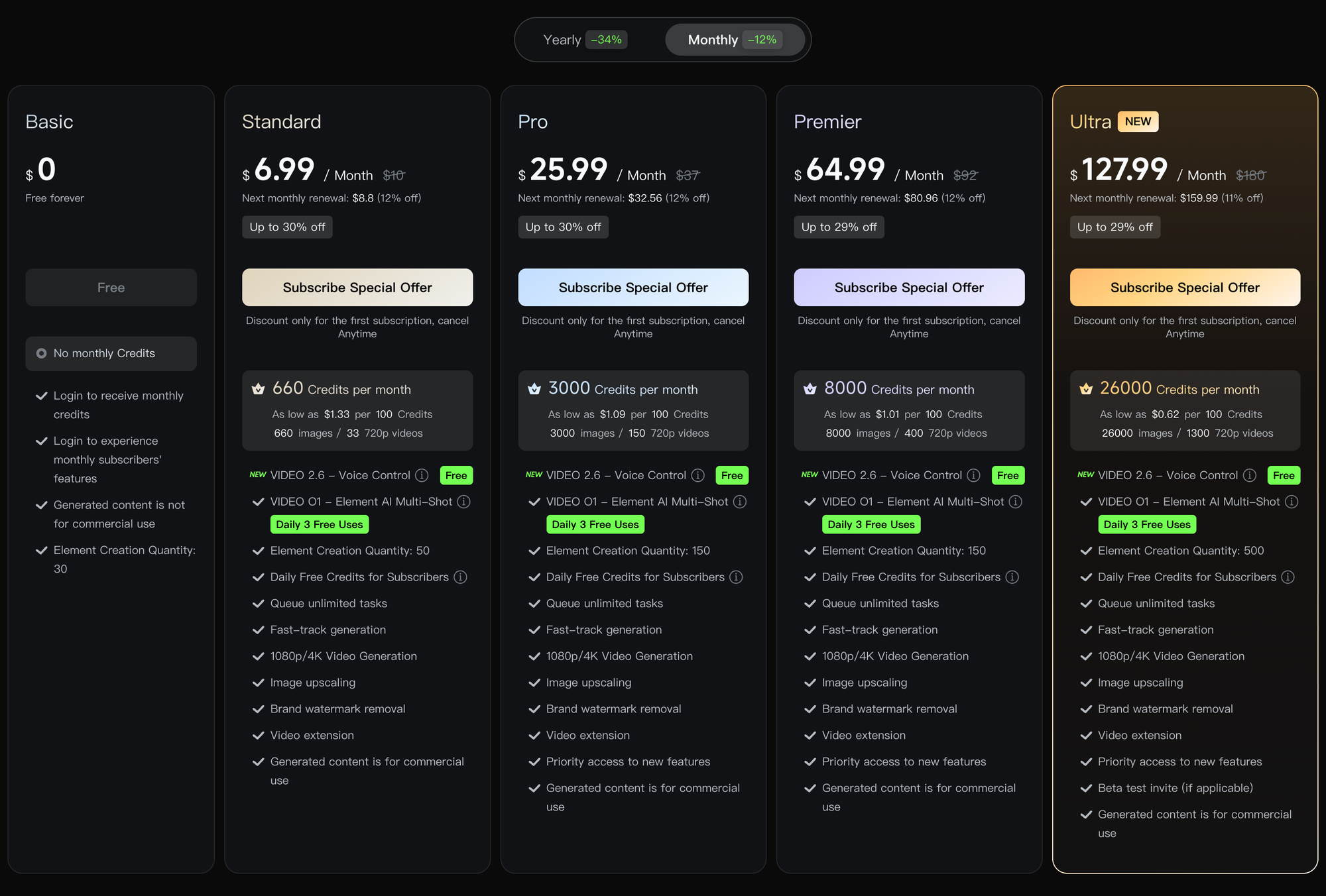
66 credits per day, refreshing at midnight. Unlike Runway's 125 one-time credits that never refill, Kling's free tier keeps giving you credits every day indefinitely. Over a month, that's roughly 2,000 credits — comparable to Kling's paid Standard plan (660 credits/month on the $6.99 plan) but spread across daily allocations rather than a monthly pool.
What those credits buy depends on the generation type. A standard 5-second clip at 720p costs roughly 10 credits on the free tier. A 10-second clip costs roughly 20. That's approximately 3–6 usable clips per day depending on length and quality settings — enough to test prompts, evaluate the model, and produce social content at modest volume.
Free tier limitations worth knowing:
- Watermarked exports (Kling watermark on all free output)
- 720p maximum resolution (1080p and 4K require paid plans)
- Slower generation queue priority than paid plans
- No access to Pro mode (highest quality generation)
- Audio generation may be limited or watermarked depending on current free tier terms
The daily credit strategy
66 credits resets every day whether you use them or not — there's no rollover. That means unused free credits are gone. The right approach is treating the daily allocation as a daily practice budget rather than a pool to conserve.
Use free credits for prompt testing. Every prompt you refine on the free tier is a prompt you don't need to test on paid credits later. The most valuable thing you can do with Kling's free tier is develop your prompting instincts — learning how the model interprets specific language, what camera direction terms produce which results, how it handles different subjects and environments.
Save the best daily output. Even at 720p with a watermark, the composition, motion quality, and character rendering of a free tier clip tells you exactly what the paid version will produce at higher resolution. If a free clip works compositionally, the paid version of the same prompt will work too.
Batch your testing. Rather than generating one clip, evaluating it, and generating another, run multiple prompt variations in a single session and compare them all. 66 credits across three or four different prompt tests gives you more useful information than six iterations of the same prompt.
What to test specifically on the free tier
Don't waste free credits on generic prompts. Test the specific things you'd pay for:
Motion quality for your use case. If you produce talking-head content, test a person speaking and walking. If you produce product content, test product motion and close-up detail. Free tier motion quality is representative of what you'll get on paid.
Multi-shot storyboard mode. Enable the Multi-Shot toggle on a free generation and test whether the AI Director's automatic shot planning matches your creative instincts. This is one of Kling's most distinctive features and worth evaluating before paying.
Subject consistency. Upload a reference image via image-to-video mode and enable Bind Subject. Check whether Kling maintains your reference character's appearance across a generation. If it doesn't work well on the free tier, it won't work better on paid.
Audio generation. If audio is available on the free tier, test it. The quality difference between Kling's audio and having to add audio separately in post is significant — knowing how it performs on your content type before paying is worth the free credit spend.
When to upgrade from free
The free tier's main constraints are watermarks, 720p resolution, and slower queue times. Upgrade to paid when:
- You need watermark-free output for client delivery or publication
- 1080p or 4K resolution matters for your output platform
- Queue wait times are affecting your workflow speed
- You need consistent daily volume beyond 66 credits worth of generation
Kling's Standard plan at $6.99/month is the most affordable paid entry point of any major AI video platform. The jump from free to paid is low enough that if you're regularly hitting the daily credit ceiling, the upgrade math is simple.
What the free tier can't tell you
A few things you genuinely can't evaluate on free that matter for a paid decision:
- Pro mode quality — Kling's highest quality generation tier requires paid plans. Free tier generates at Standard quality, which is meaningfully lower than Pro on complex scenes with detailed motion.
- 4K output — not available on free. If your workflow requires native 4K, you need to evaluate that on a paid plan.
- Volume workflows — 66 credits per day is enough for evaluation but not for production volume. One month on a paid plan gives you a real sense of whether Kling fits a high-output workflow.
Kling free vs Runway free: the honest comparison
Runway's free tier gives you 125 credits one time, ever. Kling gives you 66 credits every day indefinitely. If you're deciding which platform to evaluate first before committing to any subscription, Kling's free tier gives you more time and more iterations to make that decision — and costs nothing beyond the time spent generating.