Premiere 27.0 Adds Generate Image, Music, Soundscape and Sound Effects to the Timeline
Premiere 27.0 adds Generate Image, Music and Soundscape to the Generative Media Tool, plus Separate Crosstalk, Color Mode and an AI Assistant panel.

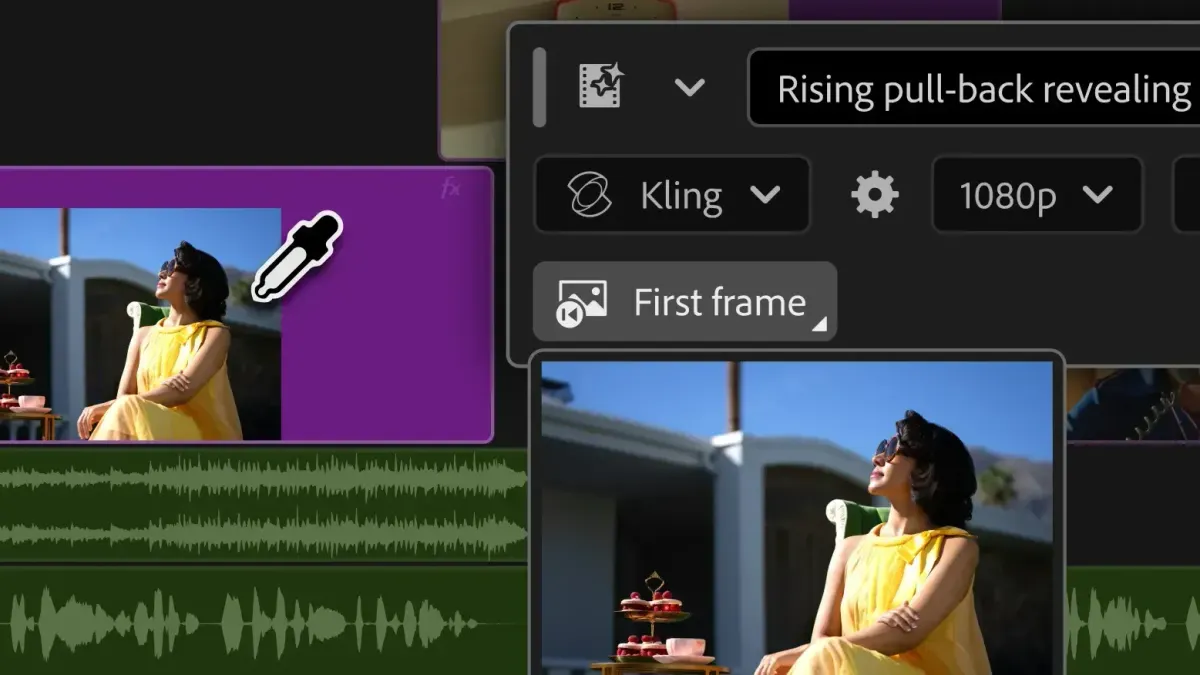
Adobe’s Premiere 27.0 release notes add Generate Image to the Generative Media Tool, alongside Generate Sound Effects, Generate Music and Generate Soundscape.
The release also adds Separate Crosstalk, which splits two overlapping speakers into separate tracks, plus a Color Mode workspace, an AI Assistant panel and a minimum GPU memory requirement.
Adobe’s notes list it as the November 2026 release, and the help page was last updated Nov 10, the day Adobe MAX opened.
The update builds on Adobe’s September announcement of the Generative Media Tool, which brought Generate Video and partner models into the timeline.
From September Beta to Premiere 27.0
Adobe introduced the Generative Media Tool on Sep 8 with Generate Video, Generate Sound Effects, Generate Soundscape and Generate Music.
Generate Video fills timeline gaps using reference frames from the project.
Adobe offered its own Firefly model alongside partner models from Google Veo, Kling, Runway and Luma.
Soundscape and Music were labeled beta in September, and Adobe described the audio tools as a public beta.
The 27.0 notes carry those features forward and add Generate Image. The notes don’t state beta status for any of them, so which features have left beta is not confirmed.
What the Generative Media Tool Does
The 27.0 notes describe Generate Image as creating images from text prompts directly on the Premiere timeline.
Generate Sound Effects includes a Sync to Video option. Adobe’s September post described the sound effects model as “commercially safe” and said editors can guide timing and intensity with their voice.
Generate Soundscape analyzes up to 15 seconds of video to build ambience and sound effects.
Generate Music produces multiple variations, with tempo and looping controls.
Generate Video, introduced in September, fills gaps in the timeline using reference frames from the project.
Generative Extend also changes in 27.0. When a transition needs more frames than a clip has, it can now create the missing frames.
The notes reference generations canceled for insufficient credits. Adobe doesn’t list per-generation costs in them.
Audio: Separate Crosstalk, Enhance Audio and Auto Ducking
Separate Crosstalk detects two overlapping speakers on a single mixed track and splits them into routable timeline stems. Adobe says it is powered by the Firefly audio service.
Enhance Audio gets improved controls and an updated experience. In September, Adobe described it as noise reduction with independent control over dialogue, music, ambience and sound effects.
Auto Ducking now updates its keyframes as clips are added, trimmed or muted. Editors no longer need to select Generate Keyframes after each change.
Adobe’s September post also mentioned a new speed algorithm that changes clip duration while preserving pitch and timbre.
Digital Production’s MAX writeup found Separate Crosstalk worked well in beta. The author said the audio claims still need listening tests on difficult location sound.
Color Mode and the AI Assistant Panel
Color Mode is a new color grading workspace placed next to the edit. In September, Adobe described it as beta, with Style Modules such as Vignette and Midtones and an Auto Color tool for clips, groups or sequences.
The 27.0 notes list the AI Assistant panel as a new feature that helps with complex or repetitive tasks using project context.
Premiere’s assistant has been in public beta since June, according to BRC’s earlier coverage. At MAX, Adobe added examples such as applying effects across a sequence, tracking masked subjects and adjusting color across clips.
Adobe’s Creative Agent is the system behind these assistants across Premiere, After Effects, Frame.io, Illustrator, InDesign and the Photoshop beta app.
Effects, Masks and Editing Changes
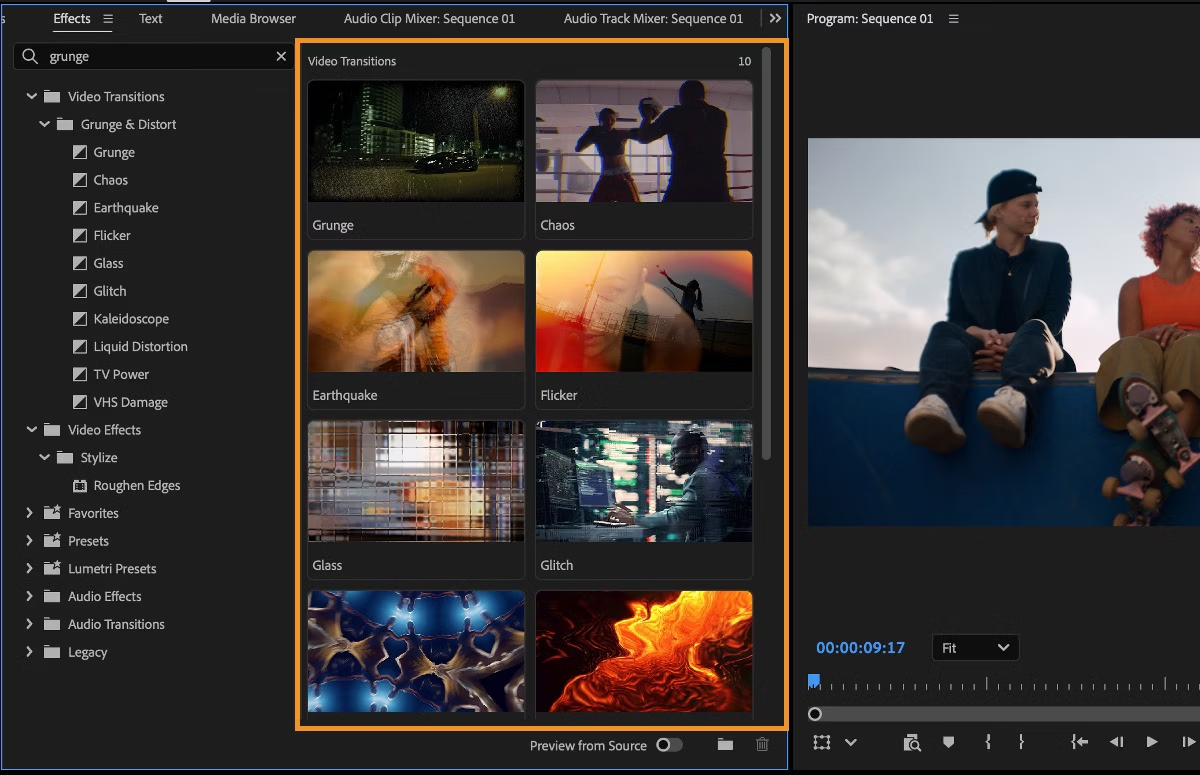
The release adds Effects panel thumbnails and preview videos, plus eight new effects. HSL Masking and improved Object Masks are also listed.
The editing changes include a redesigned clip speed dialog, a Properties panel with effect cards and real-time waveforms while recording. iXML metadata now displays, and there is a new Live Ripple Edit preference.
Hardware, Formats and the GPU Requirement
Premiere now requires a minimum amount of GPU memory. Computers below it can’t launch Premiere, and a System Compatibility Report explains why. The notes don’t give the minimum.
AI and machine learning features run faster on NVIDIA RTX GPUs. Premiere also gets native Windows on ARM support on NVIDIA RTX Spark (N1X) chips.
Format support adds Sony FX5 X-OCN, which is relevant for editors waiting on that camera. BRC’s Sony FX5 complete buying guide covers the camera itself.
ARRI ALEXA 35 Xtreme footage is supported on Windows on ARM. Sony RAW and 16-bit linear F65 RAW import support are removed.
Competitive Context
DaVinci Resolve. Blackmagic released Resolve 21.1 with a native MCP server for AI assistants. BRC covered it in DaVinci Resolve 21.1 AI assistants and MCP.
Adobe’s own MCP integrations for Premiere and After Effects are previewed, with a private beta planned for early 2027. Resolve Studio already has a built-in MCP server.
Runway on both sides. Runway is one of the partner models inside Premiere’s Generative Media Tool. It also announced a plugin for DaVinci Resolve on Sep 23.
BRC’s Runway DaVinci Resolve plugin coverage notes that Runway’s official plugin previously covered only Premiere Pro and After Effects. Resolve version requirements and model availability were unconfirmed at the time.
Resolve’s built-in AI tools. Resolve 21 added IntelliSearch, CineFocus, Face Age Transformer, Face Reshaper and an AI Speech Generator. Premiere moved Generative Extend out of beta in version 25.2.
BRC’s DaVinci Resolve vs Premiere Pro 2026 comparison covers how the two editors differ on pricing, AI features and workflow. It notes that Premiere’s Dynamic Link connects to Adobe apps in real time, while Resolve keeps Fusion, Fairlight and color in one app.
Adobe’s agent strategy. The Creative Agent powers assistants across Adobe’s apps, and BRC covered the beta availability and MCP timeline in Adobe Creative Agent AI Assistant.
Adobe’s Firefly app now includes models from ByteDance, Google, Kling, OpenAI, ElevenLabs and Topaz Labs, with Dreamina Seedance 2.5, Kling 4.0, GPT Image 2.6 and Nano Banana 2.1 among recent additions.
Standalone AI music. Generate Music competes with dedicated tools. BRC’s Suno vs ElevenMusic comparison covers two of them.
The Signal in the Noise
Features at different release stages make this a mixed update. Color Mode, Auto Ducking and Generative Extend appear as plain release-note items, while several generative features were beta when announced.
Digital Production frames generated video and audio as most useful before the final cut. Generated material helps teams agree on timing, intent and scope. It doesn’t prove a deliverable meets specifications.
The practical gains are in the audio and editing tools. Separate Crosstalk and Auto Ducking address routine dialogue and mixing work.
The GPU memory requirement is the item to check first. Editors on older machines should read the System Compatibility Report before updating.
Adobe’s own MCP support for outside agents is still a plan for early 2027, while Resolve Studio already has it built in.
Specs & Pricing
Adobe’s 27.0 notes don’t list prices or generation costs.
Exact pricing is available on Adobe’s website.
BRC’s AI video credits explainer covers how credit systems work across AI video tools.
Discussion Question
Would you use generated B-roll or sound effects in a client edit, or keep them to the rough cut?
Resources & Reads
- Adobe Premiere release notes
- Adobe: Generate and create directly in your timeline
- Adobe: Firefly expands
- Digital Production: Adobe MAX 2026, AI video and audio
- BRC: DaVinci Resolve 21.1 AI assistants and MCP
- BRC: Runway DaVinci Resolve plugin
- BRC: DaVinci Resolve vs Premiere Pro 2026
- BRC: Adobe Creative Agent AI Assistant