This 3D Editor Gives Claude a Motion Graphics Canvas You Can Actually Edit
Raylight gives Claude and other AI agents a 3D motion graphics editor, so prompts become layers and timeline blocks you can drag and adjust instead of flat renders. There’s a free plan.

AI agents like Claude have become a popular way to make quick motion graphics, but they share a frustrating limit. When one thing is wrong, you usually have to re-prompt and re-render the whole video.
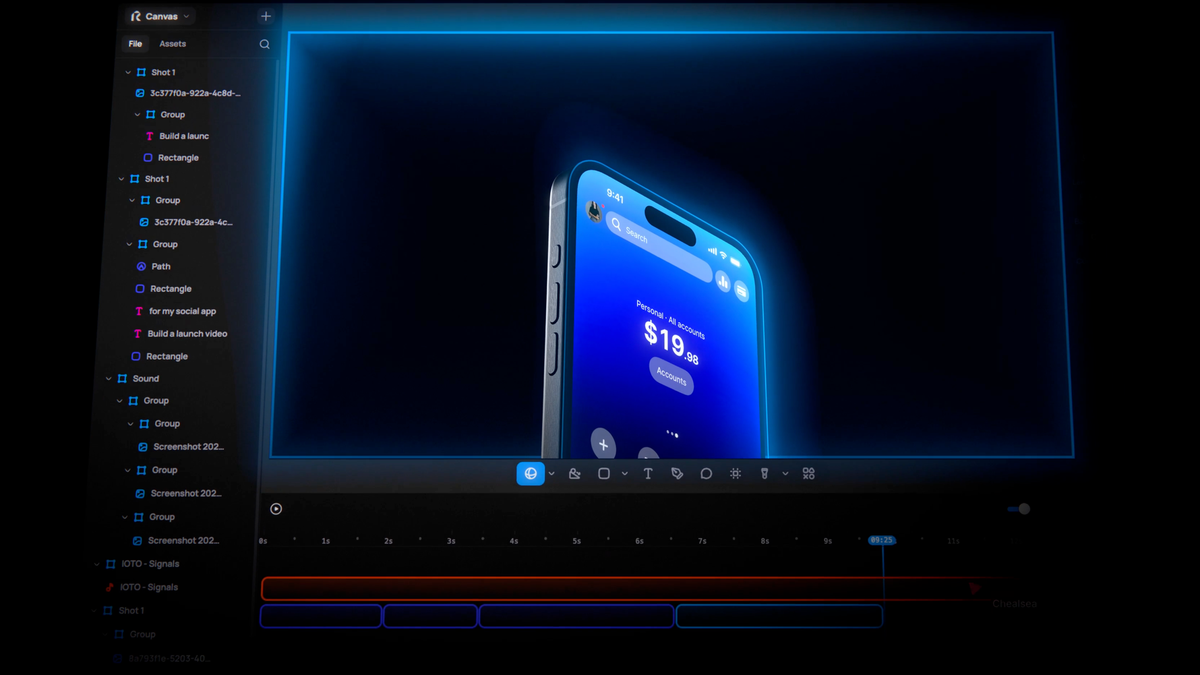
Raylight is built to fix that. The app gives Claude and other AI agents a 3D motion graphics editor, so what they create arrives as layers and timeline blocks you can adjust by hand, not a finished render you have to regenerate.
The Problem It’s Solving
Today we're launching Raylight 2.0.
— cy (@cy_burns) November 3, 2026
Everyone's making motion graphics with Claude right now. Then they need to change one thing and it's a re-prompt and a re-render.
We gave Claude a real canvas. In 3D.
> Describe the video. It lands as layers and animation blocks, not a black… pic.twitter.com/AF9fJjSuan
“Everyone’s making motion graphics with Claude right now,” wrote Cy Burns of Raylight in announcing the new version. The catch, he noted, is that changing one detail typically means starting over with a new prompt and a new render.
That’s the same problem driving a wave of tools that turn AI output into editable projects instead of flat video, covered in What Is Code-Based AI Video? A Guide to the Tools That Build Editable Videos.
How Raylight Works
You describe the video you want, either in Raylight’s app or through an AI agent. Raylight’s MCP server works with Claude, Codex, Cursor and Antigravity, so agents can build and edit projects directly.
The result lands in Raylight’s editor as layers and animation blocks on a timeline. If you don’t like a move, you can drag it to change the timing, stretch a block to change its duration or ask the agent to try again, all on the same timeline.
The editor itself is designed to feel like a design tool. Raylight describes its 3D canvas as “as good as Figma,” with snapping, alignment, grouping and smart guides for laying out shots.
3D Product Shots and Scene Tools
Raylight leans heavily on 3D. Screenshots can become 3D product shots with real lighting and shadows, and you can bring in your own 3D models or use built-in device mockups.
Camera moves are set by choosing two framings, and scene effects include depth of field and bloom. The app also includes sound effects, music and voiceover, and a Raylight API can turn written briefs into videos from code or automated workflows.
Pricing
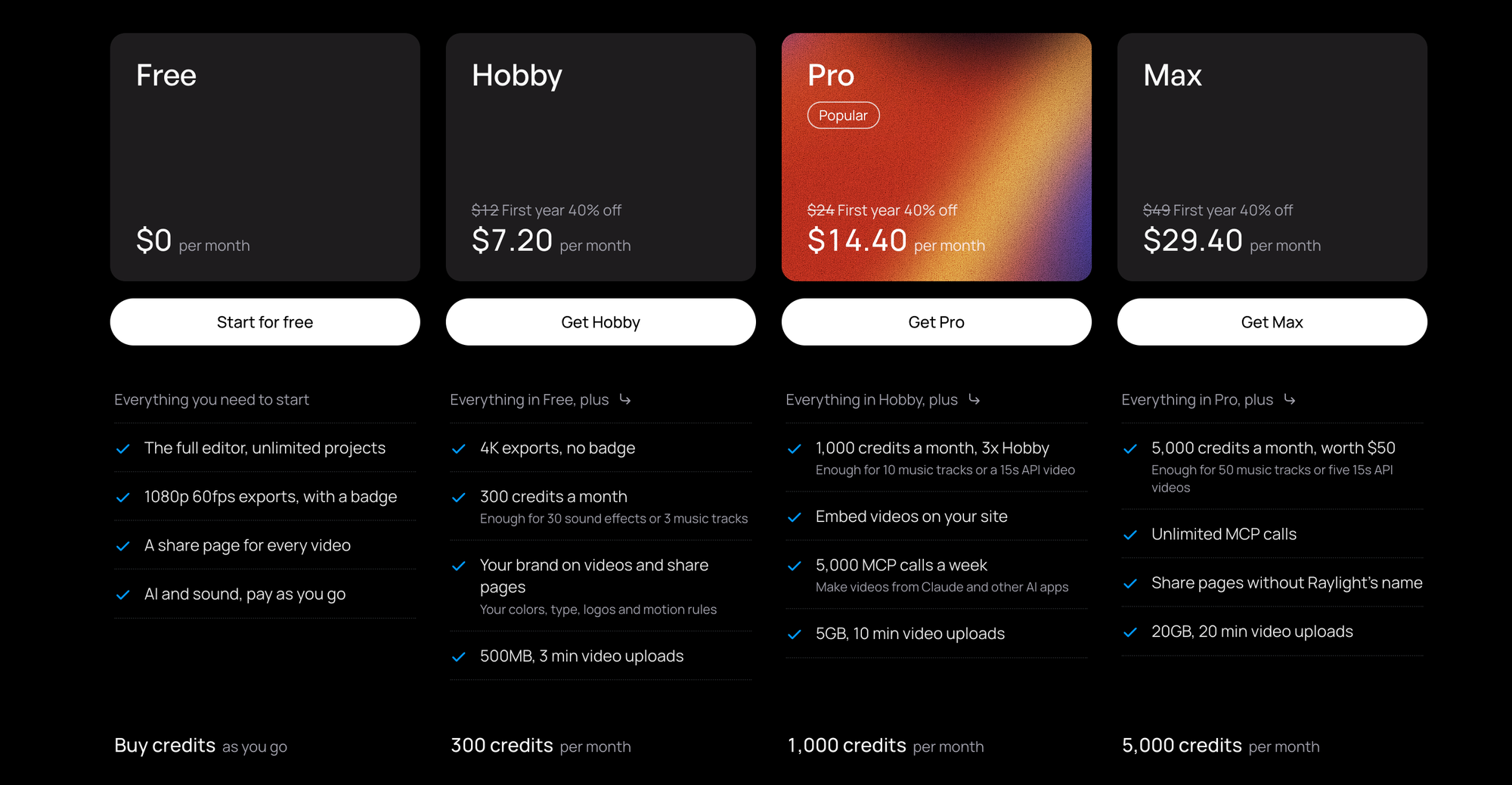
Raylight has a free plan with the full editor, unlimited projects and 1080p 60fps exports, which carry a “Made in Raylight” badge. AI generation and sound are pay-as-you-go on the free plan.
Pro costs $29 a month, or $24 a month billed yearly, and Raylight is currently offering a 40% first-year discount that brings the yearly plan to $14.40 a month. Pro adds 4K 60fps exports with no badge, 1,000 credits a month and 5,000 MCP calls a week. A Team plan for up to 10 editors costs $299 a month, or $239 a month billed yearly.
Competitive Context
Raylight joins several tools turning AI motion graphics into editable projects. Magnific Move builds layered motion graphics from prompts, covered in Magnific Move Lets You Add Motion Graphics to Video by Describing Them, and Mirage’s Tesseract gives agents a full editing engine with Premiere and After Effects conversion.
fal’s Motion to Code outputs animation as editable GSAP and shader code, covered in fal’s Motion to Code Turns a Prompt or Video Into Editable Animation Code. Raylight’s focus on 3D product shots and a design-tool-style canvas sets it apart from those 2D-focused options.
The Signal in the Noise
For marketers, app developers and creators making product videos and launch graphics, Raylight addresses the right problem. A timeline you can adjust by hand makes AI-generated motion graphics far more practical than re-prompting for every small fix.
The free plan makes it easy to test, though the badge and pay-as-you-go AI mean most regular users will end up on Pro. As with similar tools, the quality of the first draft still depends on clear direction, and motion design taste still matters.
Would you rather fix AI motion graphics by dragging them on a timeline or by re-prompting? Share how you work in the comments.
Specs & Pricing
- Free: $0; 1080p 60fps exports with “Made in Raylight” badge; pay-as-you-go AI and sound
- Pro: $29/month, or $24/month billed yearly ($14.40/month first year with current 40% discount); 4K 60fps exports, no badge, 1,000 credits/month, 5,000 MCP calls/week, videos up to 10 minutes
- Team: $299/month, or $239/month billed yearly; up to 10 editors, 30,000 pooled credits/month
- AI integrations: MCP server for Claude, Codex, Cursor and Antigravity; Raylight API