Magnific Move Lets You Add Motion Graphics to Video by Describing Them
Magnific Move creates editable motion graphics from text prompts, from logo reveals and animated charts to UI overlays that react to your footage. Here’s how it works.


Magnific, the company formerly known as Freepik, has launched Magnific Move, an AI tool that builds motion graphics from plain-language descriptions. You describe an animated chart, logo reveal, product ad or on-screen interface, then ask for changes the same way, without keyframing anything by hand.
Magnific calls it “motion graphics you can talk to,” and launched it in late October with a set of starter templates. The company followed up this weekend with a tutorial that shows the more interesting use: adding animated graphics on top of existing footage.
How It Works
Magnific Move works conversationally. You type what you want, review the result and describe what to change, and the tool edits the animation. Every layer stays editable, so you can adjust a single element, like a title’s color or a chart’s timing, without regenerating the whole piece.
Magnific offers templates for launch videos, logo reveals, product ads, animated text and charts. Each template includes the prompt used to make it, so you can see how it was built and adapt it with your own branding. Finished videos download as MP4 files.
Adding Graphics That React to Footage
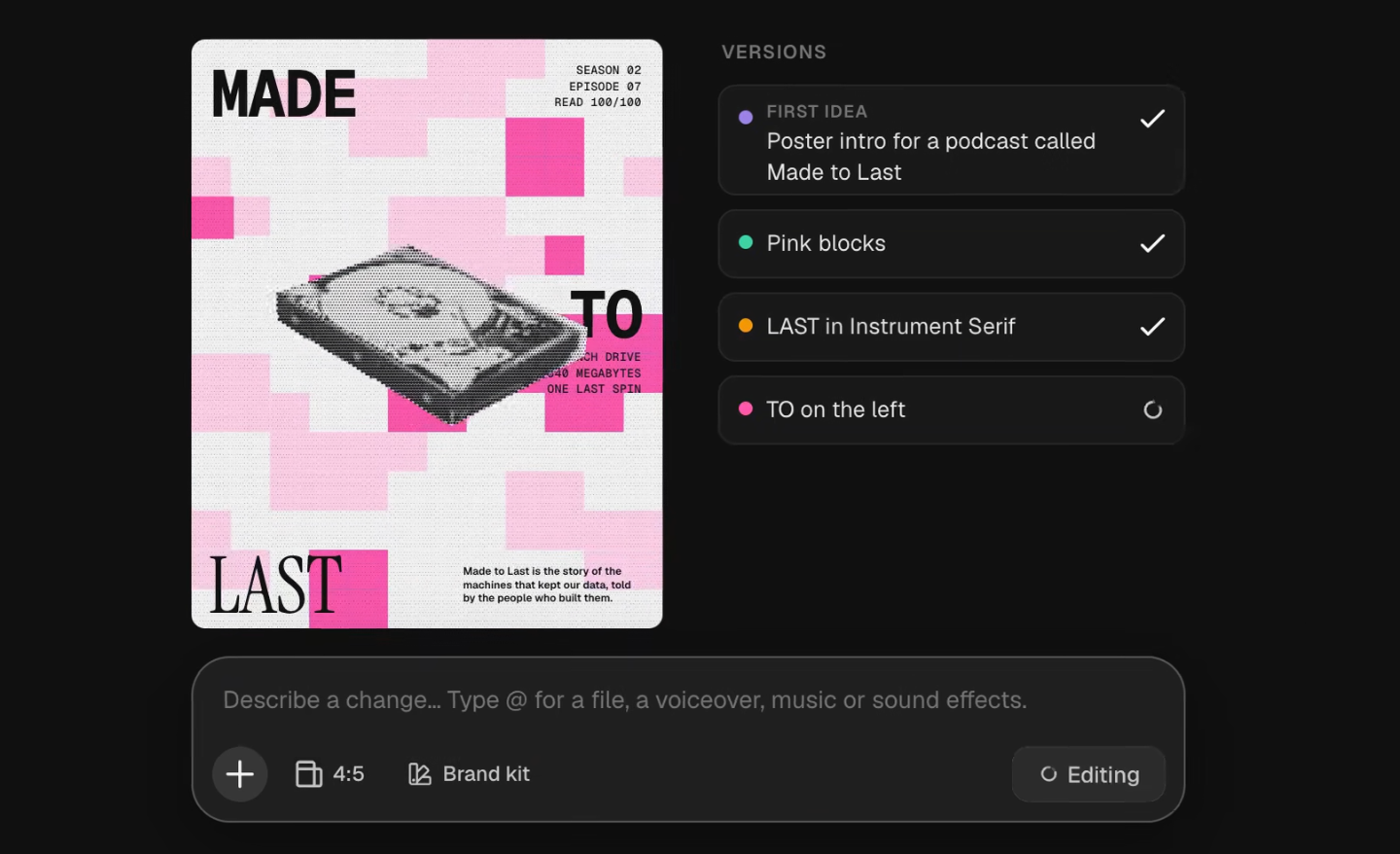
Magnific’s tutorial shows Move layering animated UI over a video. The example starts with a 30-second single-take scene generated in Seedance 2.5 from a still image, with empty space left in the frame for graphics.
That video is then brought into Magnific Move, where each action gets a graphic response. A music player appears when a record starts, a moisture meter rises as plants are watered and a delivery tracker updates as a package arrives.
To adjust the timing, you pause on a moment and describe the change, such as holding a message on screen longer. Magnific shared the full prompt for the base video, which breaks the 30 seconds into five timed beats and spells out camera movement, lighting and sound for each one. It’s a useful model for writing long single-take prompts, covered more broadly in How to Write Multi-Shot Prompts for AI Video.
What’s Still Unclear

Magnific hasn’t published pricing for Move or said which of its plans include it. Export options beyond MP4, maximum resolution and the models behind the tool also haven’t been disclosed.
Early hands-on impressions suggest the results depend heavily on the prompt. In a test by the French AI newsletter Generative, a generic request produced a weak result, while more specific direction, like asking for bold, thick typography, improved it noticeably. The newsletter’s takeaway was that Move lowers the barrier to motion graphics, but doesn’t replace motion design taste.
Competitive Context
Magnific Move is part of a wave of AI tools aimed at editable motion graphics rather than flat video. fal’s Motion to Code turns prompts and video into editable GSAP animation and shaders, covered in fal’s Motion to Code Turns a Prompt or Video Into Editable Animation Code.
Mirage’s Tesseract lets Claude and ChatGPT build editable projects from reference videos and export to Premiere and After Effects, covered in Mirage’s Tesseract Can Now Turn Any Video Into a Template for Your AI Agent. After Effects remains the professional standard, and Canva continues to add AI tools for quick social graphics.
The Signal in the Noise

For social creators and marketers who need animated text, charts and product graphics without learning After Effects, Magnific Move looks like a practical shortcut. The editable layers and conversational revisions address the biggest frustration with AI-generated graphics, which is starting over every time something’s wrong.
For motion designers, it’s more of a fast drafting tool than a replacement. Until Magnific shares pricing and export details, it’s best suited to quick social and marketing work rather than projects that need to move into a professional pipeline.
Would you use a prompt-based tool for motion graphics, or stick with After Effects? Share how you’d use it in the comments.
The Details
- Product: Magnific Move
- Company: Magnific (formerly Freepik)
- Launched: Late October 2026
- What it does: Creates and edits motion graphics from text prompts, including over existing video
- Templates: Launch videos, logo reveals, product ads, animated text, charts
- Editing: Conversational revisions; every layer stays editable
- Export: MP4
- Pricing: Not yet published; exact pricing available on Magnific’s website